
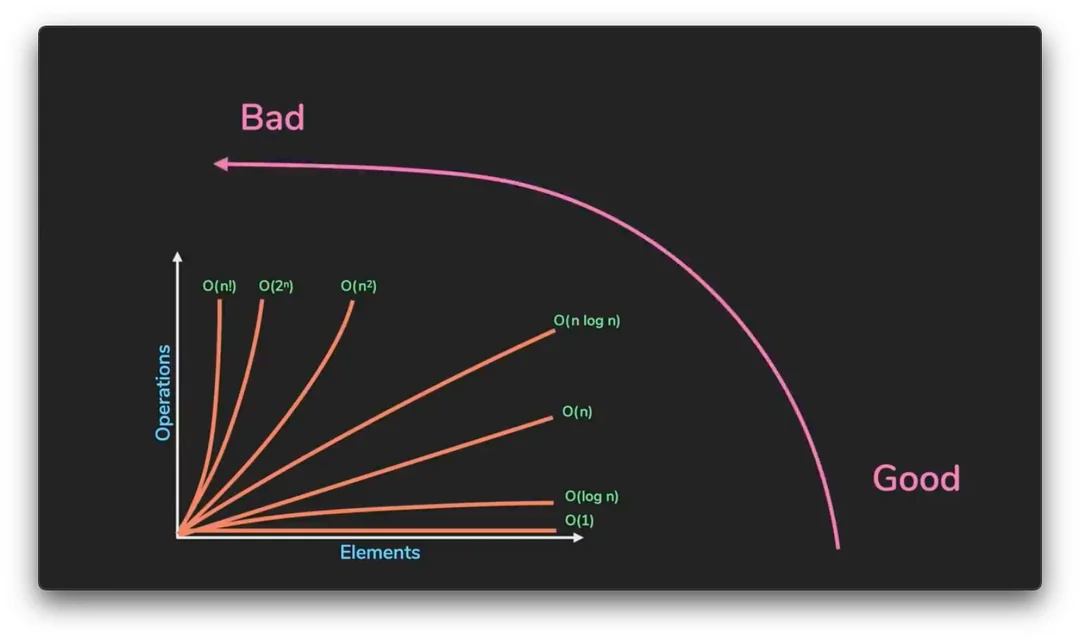
Before We Begin...
As we study computer science, we encounter Big O notation as a tool for analyzing algorithm performance. Most computer scientists are boring people, so it's perfectly natural to forget the details and move on with only a rough understanding.
A common simplified takeaway is: "The closer to O(1), the faster; the closer to O(n!), the slower."
So what is the precise definition of Big O, and why do we use this notation?

(Big O notation)
The Origins of Big O Notation
Big O notation was first introduced in 1894 by German mathematician Paul Bachmann in his book Analytische Zahlentheorie (Analytic Number Theory),
where Bachmann introduced it to compare and approximately express the growth rates of functions.
Later, Edmund Landau further refined and popularized the concept,
and Big O notation became known as "Landau notation," used in computer science to measure algorithm complexity
as a simple yet powerful tool.
Beyond Big O, the notation was also extended into variants such as Big Omega, which expresses lower bounds, and Big Theta, which expresses both upper and lower bounds simultaneously.
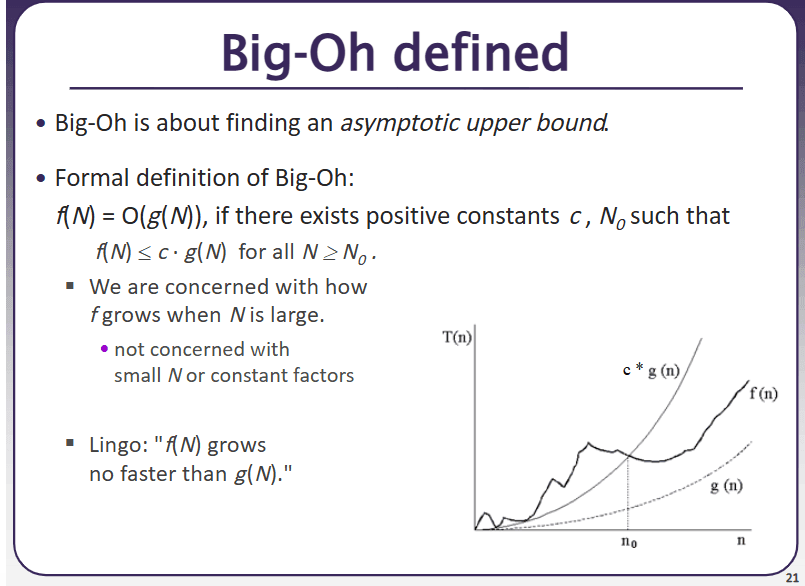
(University of Washington CSE 373 slide) Given functions and , means that for all sufficiently large ,
holds for some positive constant .
In other words, can be upper-bounded by a constant multiple of .
Let's look at an example.
f(n) = 3n² + 2n + 1
In this case, is , because we consider only the highest-order term and ignore constant factors.
What about ?
In this case, .
Big O notation is a tool for expressing the asymptotic growth rate of a function.
In a single sentence: it describes how the complexity of an algorithm grows as the input size increases.
Big O is typically used to analyze two kinds of complexity.

Time Complexity
- Represents the rate at which the "time (number of operations)" required by an algorithm increases with input size.
Representative Big O Time Complexities
O(1) → Constant Time
Examples:
Accessing an element in an array by index (e.g., arr[2]).
Looking up a value in a hash table by key (assuming no collisions).
Explanation: The operation completes in a single step regardless of input size (n).
O(log n) → Logarithmic Time
Example: Finding a value in a sorted array using binary search.
Searching for a node in a balanced binary search tree (BST).
Explanation: As the input size grows, the search space is halved at each step (e.g., repeatedly splitting the data to search).
O(n) → Linear Time
Example: A loop that traverses every element of an array once.
Searching for a specific value in a linked list.
Explanation: Execution time increases in direct proportion to the input size (n).
O(n log n) → Linearithmic Time
Examples: Merge Sort, Quick Sort, Heap Sort.
Most efficient comparison-based sorting algorithms.
Explanation: Uses a divide and conquer strategy, repeatedly splitting n elements in half (log n) and merging (n).
O(n²) → Quadratic Time
Example: Checking all combinations in an array using nested loops (e.g., Bubble Sort, Selection Sort).
Computing the shortest path between all pairs of nodes in a graph (Floyd-Warshall algorithm).
Explanation: Execution time grows quadratically as input size increases.
O(2ⁿ) → Exponential Time
Example: Naive recursive implementation of the Fibonacci sequence (many redundant calculations).
Generating all possible subsets.
Explanation: Execution time grows exponentially even for small input sizes, making it impractical.
Space Complexity
- Represents the rate at which the amount of memory used by an algorithm increases with input size.
Representative Big O Space Complexities
O(1) → Constant Space
Example: Using a single variable (e.g., a loop index i).
A fixed-size variable unrelated to input size (e.g., int a = 10).
Explanation: Only a fixed amount of memory is used, regardless of input size (n).
O(log n) → Logarithmic Space
Example: Recursive traversal of a balanced binary search tree (BST) (depth of the recursive call stack).
Average space complexity of Quick Sort (stack depth during divide and conquer).
Explanation: In recursive or divide-and-conquer algorithms, stack/memory usage is proportional to the logarithm of the input size.
O(n) → Linear Space
Example: Copying and storing the input array (e.g., newArr = arr.slice()).
Adjacency list representation of a graph (memory proportional to the number of nodes).
Explanation: Memory usage increases in direct proportion to the input size (n).
O(n log n) → Linearithmic Space
Example: Worst-case space complexity of Merge Sort (uses temporary arrays).
Recursive implementations of certain divide-and-conquer algorithms (additional memory at each level).
Explanation: Linear space is used at each level of recursion, and this occurs when the recursion depth is logarithmic.
O(n²) → Quadratic Space
Example: Adjacency matrix representation of a graph (n × n matrix).
A 2D table in dynamic programming (DP) (e.g., Longest Common Subsequence).
Explanation: Memory grows in proportion to the square of the input size, making it inefficient for large datasets.
O(2ⁿ) → Exponential Space
Example: Storing all subsets (e.g., all combinations of n elements).
Worst-case space complexity of recursive Fibonacci (duplicated call stack²).
Explanation: Memory usage grows exponentially even for small input sizes.
Both are expressed using Big O notation, and while Big O represents an upper bound, it is often used together with worst-case analysis in practice.
The key difference is:
- Time complexity focuses on speed, while space complexity focuses on memory usage.
Trade-off
- A faster algorithm may use more memory (as with dynamic programming)
to save time, or conversely, saving memory may cost more time.
Comparing recursion and iteration: they may have the same time complexity, but the recursive approach can have higher space complexity due to call stack memory usage.
For instance, hash tables are another example of trading more memory for lower time complexity.
In any case, let's look at
a table the author has compiled showing Big O for commonly known algorithms.
Time Complexity (Best - Average - Worst)
Algorithm | Best | Average | Worst |
|---|---|---|---|
Insertion Sort | |||
Selection Sort | |||
Bubble Sort | |||
Merge Sort | |||
Quick Sort | |||
Heap Sort | |||
Shell Sort | |||
Counting Sort | |||
Radix Sort | |||
Bucket Sort |
- Algorithm
Insertion Sort
- Best
- Average
- Worst
- Algorithm
Selection Sort
- Best
- Average
- Worst
- Algorithm
Bubble Sort
- Best
- Average
- Worst
- Algorithm
Merge Sort
- Best
- Average
- Worst
- Algorithm
Quick Sort
- Best
- Average
- Worst
- Algorithm
Heap Sort
- Best
- Average
- Worst
- Algorithm
Shell Sort
- Best
- Average
- Worst
- Algorithm
Counting Sort
- Best
- Average
- Worst
- Algorithm
Radix Sort
- Best
- Average
- Worst
- Algorithm
Bucket Sort
- Best
- Average
- Worst
1. Insertion Sort
Best:
When the data is already sorted, each element is compared but no shifting is needed.
Example: [1, 2, 3, 4] only requires comparisons; no insertions are necessary.
Average:
When data is randomly distributed, each element requires shifting approximately half the time on average.
Worst:
When the data is in reverse order, every element must be compared and shifted against all preceding elements.
Example: With [4, 3, 2, 1], each element requires up to n comparisons and shifts.
2. Selection Sort
Best/Average/Worst:
All
Performance is always the same regardless of the state of the input data.
Reason: At every step, the minimum (or maximum) value must be found among the remaining elements, so the number of comparisons is always fixed.
Even in the best case, only the number of swaps decreases; the number of comparisons does not change.
3. Bubble Sort
Best:
When the data is already sorted, if no swaps occur during a single scan, the algorithm can terminate early.
Example: With [1, 2, 3, 4], no swaps occur, so the algorithm terminates after one full scan.
Average:
With random data, each element needs to travel approximately half the array on average.
Worst:
When the data is in reverse order, every element requires up to n comparisons and swaps.
Example: With [4, 3, 2, 1], every element must shift one position at a time.
4. Merge Sort
Best/Average/Worst:
All
Reason: Merge Sort always performs the same operations during the divide and conquer phases.
The divide and merge process proceeds identically regardless of the state of the input data.
5. Quick Sort
Best:
When the pivot is always chosen as the median value, the splits are balanced.
Example: With [4, 1, 3, 2, 6, 5], if the pivot happens to be the median.
Average:
In most cases, when the pivot lands in a balanced position, O(n log n) performance is maintained.
Worst:
When the pivot is always the smallest or largest value, the splits are unbalanced.
Example: With already-sorted data like [1, 2, 3, 4, 5], choosing the first element as the pivot means only one side is split every time.
6. Heap Sort
Best/Average/Worst:
All
Reason: The process of extracting data using a heap data structure always performs the same operations.
The heap construction and extraction process proceeds identically regardless of the state of the input data.
7. Shell Sort
Best:
Efficient when the gap is well-chosen and the data is nearly sorted.
Average:
In typical cases, the gap decreases incrementally and the data becomes progressively sorted.
Note that Shell Sort's time complexity varies depending on the gap sequence and is known to fall between ; however, the empirical value of is commonly used in practice.
Worst:
Inefficient when the gap is poorly chosen or the data is in reverse order.
8. Counting Sort
Best/Average/Worst:
All
Reason: When the data range (k) is small, the data is sorted by direct counting, yielding consistent performance regardless of the state of the input.
However, memory usage increases when k is large.
9. Radix Sort
Best/Average/Worst:
All
Reason: Because sorting is done digit by digit, the same amount of work is performed in proportion to the data size (n) and the number of digits (k).
Performance is consistent regardless of the state of the input data.
10. Bucket Sort
Best:
When the data is uniformly distributed and no sorting within buckets is needed.
Average:
When the data is generally uniformly distributed but some sorting within buckets is required.
Worst:
When data is concentrated in a single bucket, the sorting cost within that bucket increases.
Space Complexity (Best - Average - Worst)
Algorithm | Best | Average | Worst |
|---|---|---|---|
Insertion Sort | |||
Selection Sort | |||
Bubble Sort | |||
Merge Sort | |||
Quick Sort | |||
Heap Sort | |||
Shell Sort | |||
Counting Sort | |||
Radix Sort | |||
Bucket Sort |
- Algorithm
Insertion Sort
- Best
- Average
- Worst
- Algorithm
Selection Sort
- Best
- Average
- Worst
- Algorithm
Bubble Sort
- Best
- Average
- Worst
- Algorithm
Merge Sort
- Best
- Average
- Worst
- Algorithm
Quick Sort
- Best
- Average
- Worst
- Algorithm
Heap Sort
- Best
- Average
- Worst
- Algorithm
Shell Sort
- Best
- Average
- Worst
- Algorithm
Counting Sort
- Best
- Average
- Worst
- Algorithm
Radix Sort
- Best
- Average
- Worst
- Algorithm
Bucket Sort
- Best
- Average
- Worst
1. Insertion Sort, Selection Sort, Bubble Sort, Heap Sort, Shell Sort
All are in-place sorting algorithms that require almost no additional memory.
Space complexity is always .
2. Merge Sort
An additional array is needed to temporarily store the divided subarrays.
Space complexity is always , which is one of the main drawbacks of Merge Sort.
3. Quick Sort
Additional memory is required due to the recursive call stack.
On average, space is needed, but in the worst case it can grow to .
4. Counting Sort
Additional memory is required depending on the data range (k).
Space complexity is .
5. Radix Sort
Because sorting is done by individual digits, additional memory proportional to both the data size (n) and the range (k) is required.
Space complexity is .
6. Bucket Sort
Because data is divided into buckets, additional memory proportional to the data size and the number of buckets is required. (The space needed to store the buckets themselves is ; cases where data clusters in a single bucket affect time complexity.)
Space complexity is .
In any case, this post is not about mathematically deriving the Big O of sorting algorithms.
So why was this post written?
It was written to talk about the limitations of Big O.

*All models are wrong, but some are useful.*
— George Box, UW-Madison
Misconceptions and Limitations of Big O
Big O is simply a simplified model of complexity and cannot capture every variable in the real world.
It is only a quick way to compare the efficiency of algorithms.
Let's look at some examples.
1. Big O is an asymptotic upper bound. Worst case is not the whole story.
using System;
using System.Diagnostics;

class QuickSortExample
{
    // Worst case: first element chosen as pivot
    static void QuickSortWorst(int[] arr, int left, int right)
    {
        if (left >= right) return;
        int pivot = arr[left];
        int i = left + 1;
        for (int j = left + 1; j <= right; j++)
        {
            if (arr[j] < pivot)
            {
                Swap(arr, i, j);
                i++;
            }
        }
        Swap(arr, left, i - 1);
        QuickSortWorst(arr, left, i - 2);
        QuickSortWorst(arr, i, right);
    }

    // Average case: middle element chosen as pivot
    static void QuickSortAvg(int[] arr, int left, int right)
    {
        if (left >= right) return;
        int mid = left + (right - left) / 2;
        Swap(arr, mid, right);
        int pivot = arr[right];
        int i = left - 1;
        for (int j = left; j < right; j++)
        {
            if (arr[j] < pivot)
            {
                i++;
                Swap(arr, i, j);
            }
        }
        Swap(arr, i + 1, right);
        int pivotIndex = i + 1;
        QuickSortAvg(arr, left, pivotIndex - 1);
        QuickSortAvg(arr, pivotIndex + 1, right);
    }

    static void Swap(int[] arr, int i, int j)
    {
        int temp = arr[i];
        arr[i] = arr[j];
        arr[j] = temp;
    }

    static int[] MakeSorted(int n)
    {
        int[] arr = new int[n];
        for (int i = 0; i < n; i++) arr[i] = i;
        return arr;
    }

    static int[] MakeRandom(int n)
    {
        int[] arr = new int[n];
        Random rand = new Random(42);
        for (int i = 0; i < n; i++) arr[i] = rand.Next(n);
        return arr;
    }

    static void Main()
    {
        const int N = 50000;

        // JIT warmup
        int[] warmup = MakeRandom(1000);
        QuickSortWorst(warmup, 0, warmup.Length - 1);
        warmup = MakeRandom(1000);
        QuickSortAvg(warmup, 0, warmup.Length - 1);

        int[] sorted = MakeSorted(N);
        var stopwatch = Stopwatch.StartNew();
        QuickSortWorst(sorted, 0, sorted.Length - 1);
        stopwatch.Stop();
        Console.WriteLine($"Worst case (n={N}, sorted array + first element pivot): {stopwatch.Elapsed.TotalMilliseconds:F2}ms");

        int[] random = MakeRandom(N);
        stopwatch.Restart();
        QuickSortAvg(random, 0, random.Length - 1);
        stopwatch.Stop();
        Console.WriteLine($"Average case (n={N}, random array + middle element pivot): {stopwatch.Elapsed.TotalMilliseconds:F2}ms");
    }
}
Quick Sort averages , but its worst case is . Because Big O is conventionally written in terms of the worst case, Quick Sort is sometimes introduced as an algorithm, yet its theoretical classification is .
This is where a gap between theory and reality arises. Running the code above shows that on random arrays (average-case input), Quick Sort actually behaves close to . Seeing only the label and concluding the algorithm is slow is not justified.
Going further, for small values of n, an algorithm that is theoretically can sometimes be faster than one that is . The reason is cache locality. Because Big O ignores constant factors and cache efficiency, when n is not large enough, hardware characteristics dominate performance over complexity class.
2. Constant factors are ignored.
using System;
using System.Diagnostics;

class ConstantCoefficientExample
{
    static long F(int n)
    {
        return 100L * n + 1000;  // O(n)
    }

    static long G(int n)
    {
        return (long)(0.1 * n * n);  // O(n²)
    }

    static void Main()
    {
        const int N = 10;
        const int ITERATIONS = 10_000_000;

        // JIT Warmup
        F(N);
        G(N);

        long dummy = 0;

        var stopwatch = Stopwatch.StartNew();
        for (int i = 0; i < ITERATIONS; i++) dummy += F(N);
        stopwatch.Stop();
        Console.WriteLine($"O(n) function {ITERATIONS:N0} iterations: {stopwatch.Elapsed.TotalMilliseconds:F2}ms  (dummy={dummy})");

        dummy = 0;
        stopwatch.Restart();
        for (int i = 0; i < ITERATIONS; i++) dummy += G(N);
        stopwatch.Stop();
        Console.WriteLine($"O(n²) function {ITERATIONS:N0} iterations: {stopwatch.Elapsed.TotalMilliseconds:F2}ms  (dummy={dummy})");

        Console.WriteLine($"\nFor n={N}, an O(n) algorithm with a large constant factor (e.g., 100) can be slower than an O(n²) algorithm for small input sizes.");
    }
}
Given and , Big O classifies them as and respectively.
However, when n is small, can actually be faster.
The code above illustrates this. When , the function with a constant factor of 100 can actually run slower than the one.
3. The same complexity class does not guarantee the same real-world performance.
using System;
using System.Diagnostics;

class QuickSortExample
{
    static void QuickSort(int[] arr, int left, int right)
    {
        if (left >= right) return;
        int mid = left + (right - left) / 2;
        Swap(arr, mid, right);
        int pivot = arr[right];
        int i = left - 1;
        for (int j = left; j < right; j++)
        {
            if (arr[j] < pivot)
            {
                i++;
                Swap(arr, i, j);
            }
        }
        Swap(arr, i + 1, right);
        int pivotIndex = i + 1;
        QuickSort(arr, left, pivotIndex - 1);
        QuickSort(arr, pivotIndex + 1, right);
    }

    static void Swap(int[] arr, int i, int j)
    {
        int temp = arr[i];
        arr[i] = arr[j];
        arr[j] = temp;
    }

    static void Main()
    {
        const int N = 1_000_000;
        Random rand = new Random(42);

        int[] baseArr = new int[N];
        for (int i = 0; i < N; i++) baseArr[i] = rand.Next(N);

        // JIT Warmup
        int[] warmup = new int[1000];
        Array.Copy(baseArr, warmup, 1000);
        QuickSort(warmup, 0, warmup.Length - 1);

        int[] arr = new int[N];
        Array.Copy(baseArr, arr, N);
        var stopwatch = Stopwatch.StartNew();
        QuickSort(arr, 0, arr.Length - 1);
        stopwatch.Stop();
        Console.WriteLine($"Quick Sort (n={N:N0}): {stopwatch.Elapsed.TotalMilliseconds:F2}ms");
    }
}using System;
using System.Diagnostics;
class HeapSortExample
{
static void HeapSort(int[] arr)
{
int n = arr.Length;
for (int i = n / 2 - 1; i >= 0; i--)
Heapify(arr, n, i);
for (int i = n - 1; i > 0; i--)
{
Swap(arr, 0, i);
Heapify(arr, i, 0);
}
}
static void Heapify(int[] arr, int n, int i)
{
int largest = i;
int left = 2 * i + 1;
int right = 2 * i + 2;
if (left < n && arr[left] > arr[largest]) largest = left;
if (right < n && arr[right] > arr[largest]) largest = right;
if (largest != i)
{
Swap(arr, i, largest);
Heapify(arr, n, largest);
}
}
static void Swap(int[] arr, int i, int j)
{
int temp = arr[i];
arr[i] = arr[j];
arr[j] = temp;
}
static void Main()
{
const int N = 1_000_000;
Random rand = new Random(42);
int[] baseArr = new int[N];
for (int i = 0; i < N; i++) baseArr[i] = rand.Next(N);
// JIT Warmup
int[] warmup = new int[1000];
Array.Copy(baseArr, warmup, 1000);
HeapSort(warmup);
int[] arr = new int[N];
Array.Copy(baseArr, arr, N);
var stopwatch = Stopwatch.StartNew();
HeapSort(arr);
stopwatch.Stop();
Console.WriteLine($"Heap sort (n={N:N0}): {stopwatch.Elapsed.TotalMilliseconds:F2}ms");
}
}Quick Sort and Heap Sort both have an average time complexity of O(n log n).
However, Heap Sort has a larger constant factor and irregular memory access patterns, which leads to lower cache efficiency. Running both implementations shows that although their theoretical complexities are identical, Quick Sort is generally faster in measured runtime.
This is because the factors Big O ignores, namely constant factors, cache locality, and hardware characteristics, ultimately determine actual performance. The row-major vs. column-major access pattern in nested loops discussed in a previous post is the same phenomenon.
The complexity is identical, but increased cache misses cause a noticeable difference in speed.
(Visualizing Big O time complexity)
Closing Thoughts...
Ultimately, Big O is a powerful tool, but it is not always the right answer.
We tend to worship powerful theories as though they will solve everything.
But theory is only a partial abstraction extracted from reality.
Use theory as a compass for solving problems, but also look around to verify whether that path actually holds up in practice.