
Cybersecurity for Solo Developers and Non-Employer Businesses
A Reading of NIST CSWP 50
Bring up security with a freelancer or solo business owner, and you typically get the same reaction: they're already swamped meeting deadlines and responding to client emails, so where would they find time to adopt elaborate security solutions or draft separate policies? That's a fair point, and honestly, most people don't know much about security. I reference OWASP myself, but my knowledge only goes so far.
In the meantime, a U.S. white paper on doing cybersecurity well has just come out.
It is NIST CSWP 50 (Small Business Cybersecurity: Non-Employer Firms), published by the National Institute of Standards and Technology (NIST) on November 2, 2026, authored by Daniel Eliot, Jeffrey A. Marron, and Savann Thorn.
According to U.S. Small Business Administration (SBA) statistics, 81.9% of the 34.8 million small businesses in the country are non-employer firms, meaning sole proprietors, freelancers, independent contractors, single-member LLCs, and gig workers who employ no paid staff other than the owner (pp. ii, 1).
Looking back at earlier security documents, NIST IR 7621 from 2009 and its 2016 revision IR 7621r1 covered small business information security broadly in a single publication; but after a 2024 public comment period and a draft IR 7621r2, the document was renamed CSWP 50 and its focus was sharply narrowed to cybersecurity for solo and non-employer firms with simple IT setups (Appendix C, p. 27). The scope and difficulty level are equally suited to small teams with very few employees and a lean computing environment.
This is more of a mindfulness-oriented checklist than a guide to code security for individual developers, so it may not be essential reading for most developers, but I took the time to go through it myself and jotted down a few key points.
Original links: Official PDF · DOI
What to protect
The basic goals of security are commonly summed up in three words: Confidentiality, Integrity, and Availability.
They mean preventing unauthorized parties from accessing your data, ensuring data is not secretly altered, and making sure you can access what you need whenever you need it. For a solo operation, all three translate directly into whether you can keep working tomorrow.
If you can't log in to your bank account or cloud storage, work stops immediately (Availability); if a design document or codebase has been silently changed, you end up with a delivery incident (Integrity); and if customer information is leaked, you face penalties and reputational damage (Confidentiality).
So where do you start?
Counting the number of vulnerabilities or security programs quickly becomes a never-ending exercise. Risk is the product of Threat, Vulnerability, Likelihood, and Impact all working together, so even the same vulnerability carries a completely different priority depending on what data and transactions depend on it.
There is no arithmetic formula that applies equally to every business, which is why the first step is identifying which assets would be most devastating to lose or lose access to.
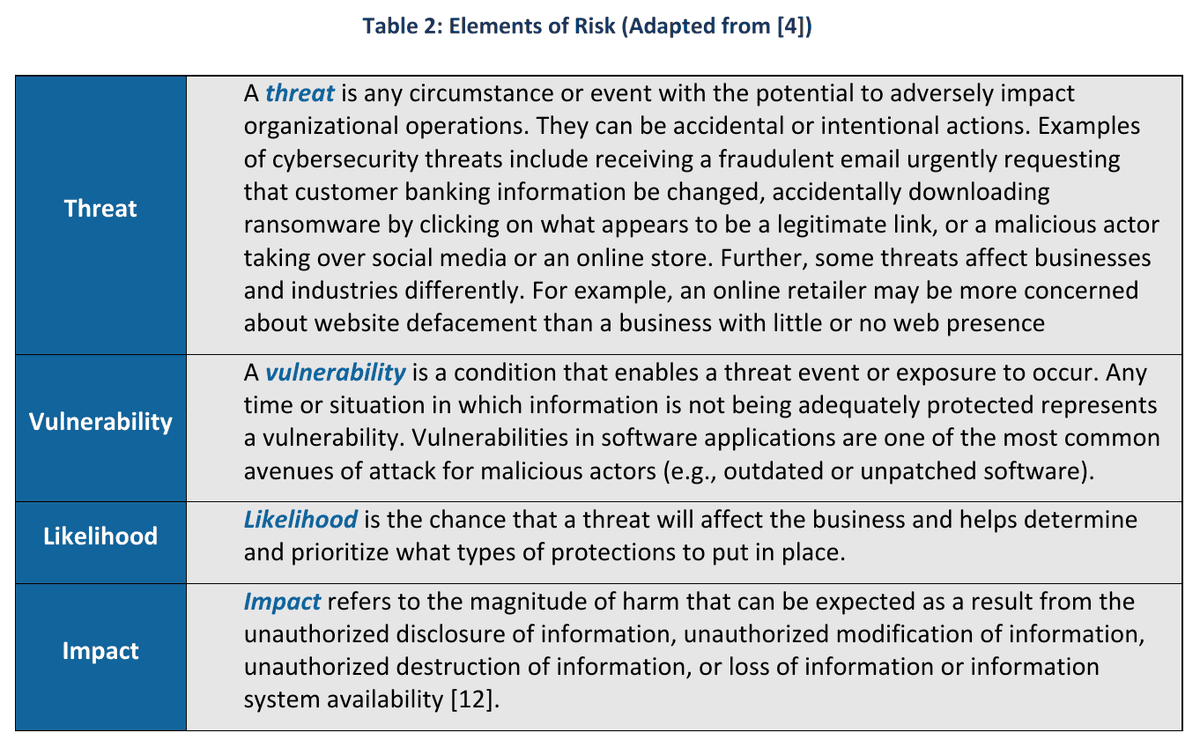
(Source) NIST CSWP 50, Table 2, p. 4 / PDF p. 8. This is the original table containing definitions and examples of the four components of risk.
Assets here include customer data, software, email and domain accounts, cloud services, and outsourced vendors — in short, every tangible and intangible element your business depends on. It is worth taking time to check what data you receive, where it is stored, and to whom it is sent, as well as who has access and how your devices are interconnected.
Wherever possible, it is better to start reducing the mixing of personal devices and accounts with business assets from this point forward. (In that sense, my own practice of handling both business and personal matters through a single Gmail account is a good example of what not to do.)
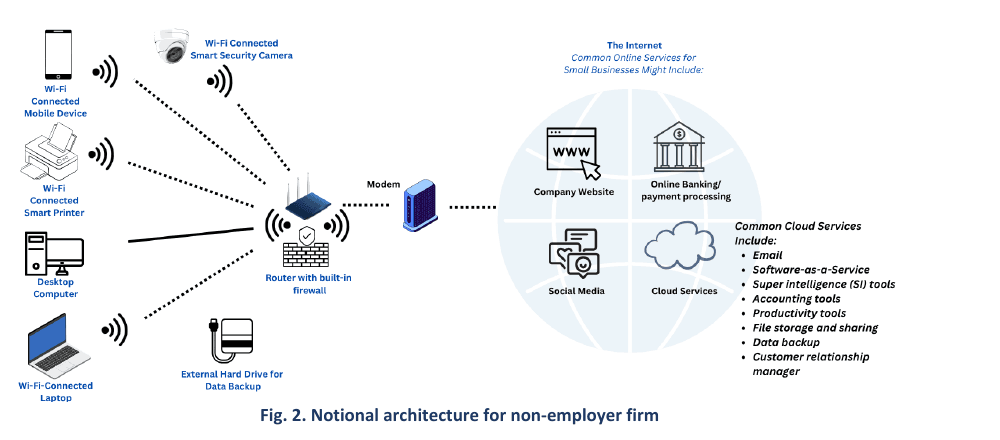
The figure above comes from NIST CSWP 50, Fig. 2, p. 3 / PDF p. 7 and shows a connectivity example for a hypothetical solo business. It illustrates the equipment typically found in a small one-person office.
The diagram shows a router and modem at the center, with a desktop computer, laptop, mobile phone, wireless printer, security camera, and external backup drive all connected to it, while on the other side of the internet a chain of cloud services runs: the business website, online banking, social media, email, accounting tools, and AI tools. It makes plain that leaving the router's default password unchanged, carelessly clicking a phishing link that arrives by text or email, or having a single unpatched vulnerability in a website can be enough to shake the entire network.
For that reason, to keep this kind of network secure in the first place, the guidance calls for organizing the following basics.
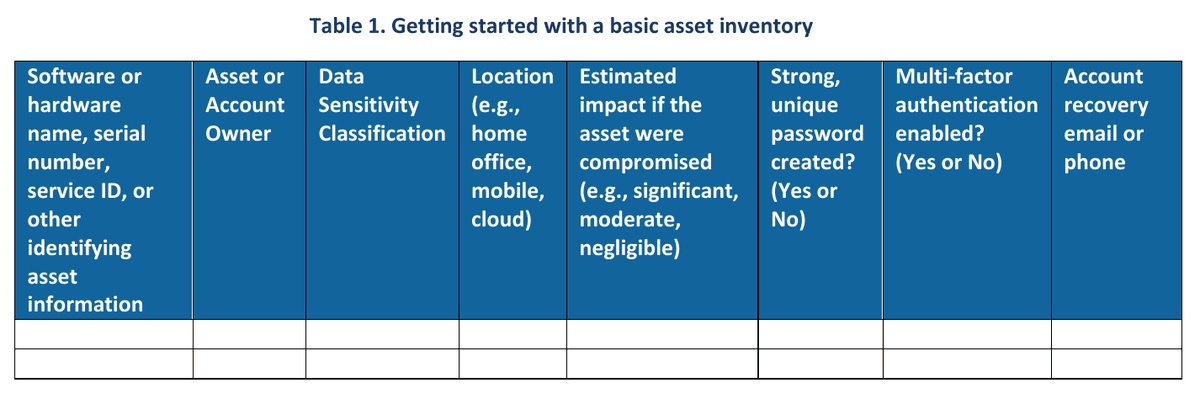
(Source) NIST CSWP 50, Table 1, p. 3 / PDF p. 7. This is the original form from the publication, with blank rows left for you to fill in; each column corresponds to the items listed below.
Hardware or software name (along with identifying information such as serial number or service ID)
Asset or account owner
Data sensitivity classification
Location (home office, mobile, cloud, etc.)
Expected impact if compromised (High, Medium, or Low)
Whether a strong, unique password is set (
Yes / No)Whether Multi-Factor Authentication (MFA) is enabled (
Yes / No)Recovery email address or phone number for the account
One point that must be stressed here: the password column should contain only Yes or No to indicate whether a strong password is set; you must never write the actual password string in your asset inventory file. The very spreadsheet you create to improve your security would become a treasure map for an attacker.
(This is, honestly, pretty common. People tend to store everything in one place as a CSV or XLSX file, but storing passwords as digital data carries a certain level of risk in and of itself from a security standpoint. In this case, writing them down in a physical notebook is actually safer. Of course, a physical notebook can be lost too, but in most cases, jotting things down in a way that only you can decipher in a physical notebook is the safer approach.)
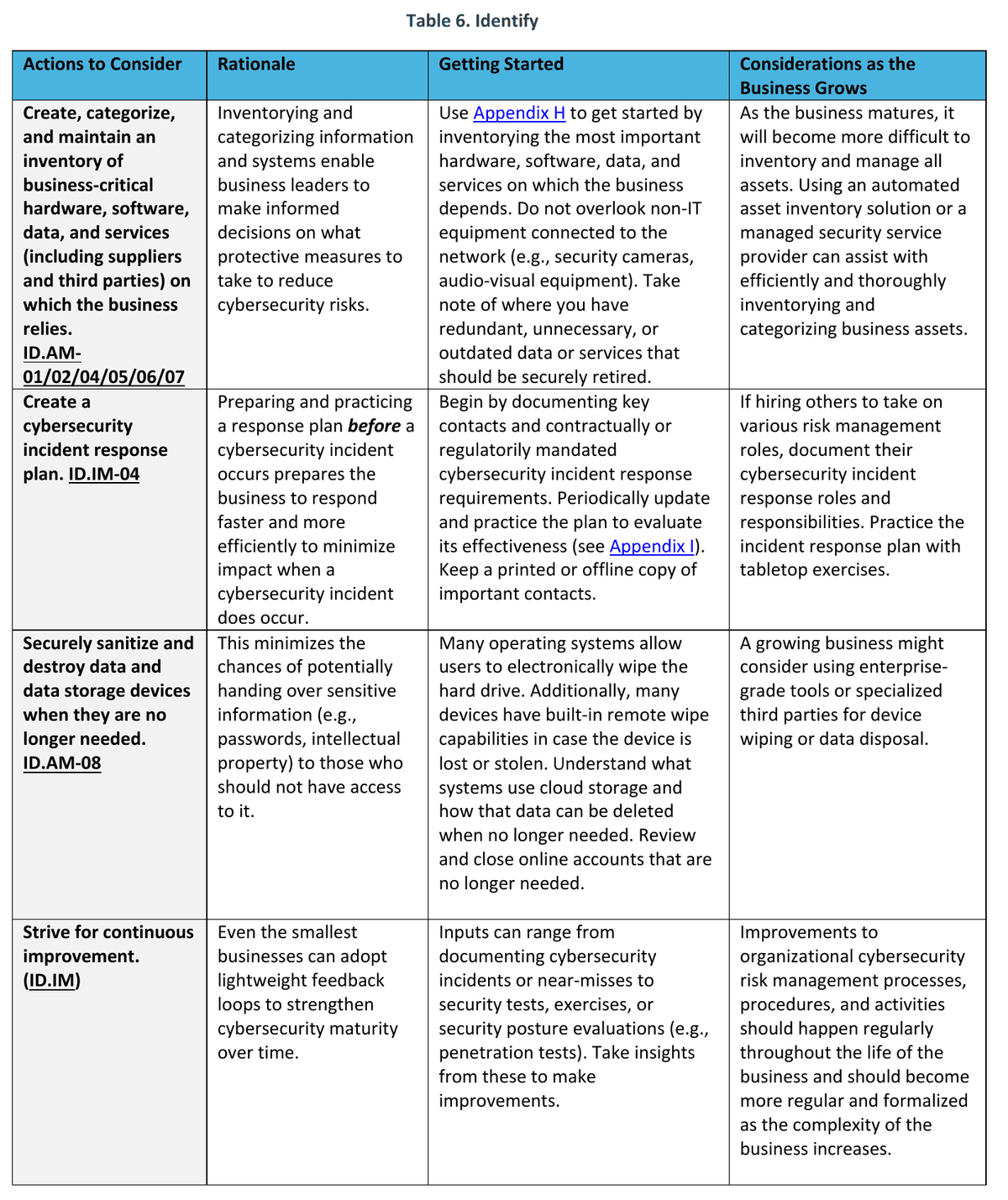
(Source) NIST CSWP 50, Table 6, p.12 / PDF p.16. This is the first page of the Identify table, which covers not only the asset inventory but also incident response planning, asset disposal, and improvement activities.
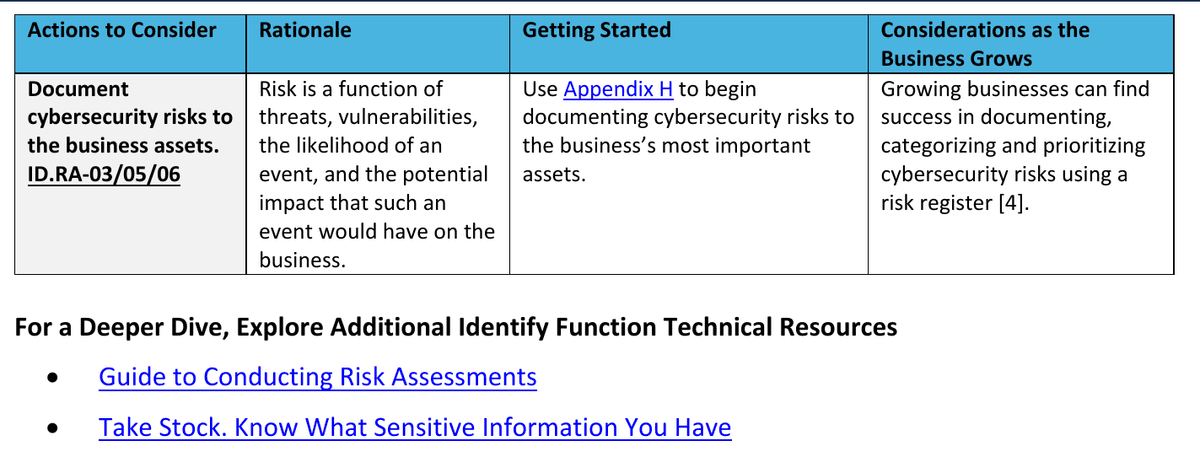
(Source) NIST CSWP 50, Table 6
It is also worth noting that asset management is not something you do only while a device is in active use. When disposing of an old PC or external hard drive, or canceling a cloud service, simply moving files to the trash and emptying it leaves data intact on the storage medium. You should use the operating system's disk reset function (secure electronic erasure) or Remote Wipe to completely remove sensitive information, and you should also track down any data remaining in cloud storage and close any online accounts you no longer use. In short, devices you plan to sell or list on a secondhand marketplace need to be fully wiped before they leave your hands.
Examples of the Six Pillars of CSF 2.0
Let's walk through the cybersecurity core, that is, the six core Functions that NIST CSF 2.0 defines, and use them as a checklist to fill in any gaps.
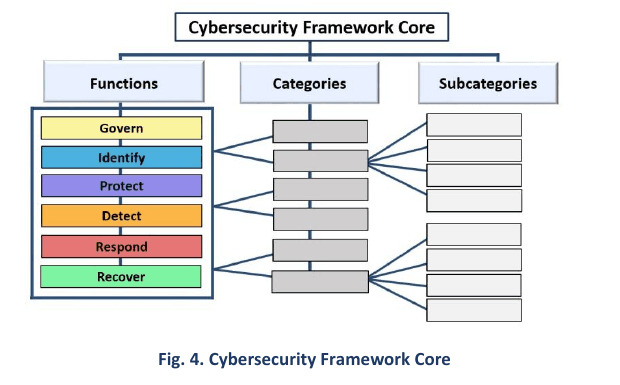
The diagram from NIST CSWP 50, Fig. 4, p.9 / PDF p.13 shows how Categories and Subcategories branch out beneath each of the major Functions.
There is no need to memorize the classification codes; it is enough to keep in mind what question each Function answers for your business.
Function | Question It Asks | Starting Point for a Solo Operator | Source Page |
|---|---|---|---|
Govern (Governance and Direction-Setting) | What must be protected, and with whom are responsibilities shared? | Document legal, regulatory, and contractual requirements, and review the terms of your vendors and insurance. | p.11 |
Identify (Asset and Risk Identification) | What do you depend on, and where are the risks? | Start by inventorying your assets and risks, drafting an incident response plan, and cleaning up unnecessary data and accounts. | p.12-13 |
Protect (Protection and Mitigation) | How do you reduce breaches and damage? | Apply the Principle of Least Privilege, change default passwords, keep software updated, maintain backups, enable Multi-Factor Authentication (MFA), and invest in security training. | p.14-17 |
Detect (Detection and Monitoring) | How do you notice warning signs? | Turn on security software, logging, and login and transaction alerts, and also monitor physical access. | p.18 |
Respond (Incident Response) | What do you do when an incident occurs? | Follow the plan to document, communicate, notify, and isolate the incident, then find ways to maintain business continuity. | p.19 |
Recover (Recovery) | Can you safely return to normal operations? | Verify backups and account status, restore operations, communicate with stakeholders, and document lessons learned. | p.20 |
- Function
Govern (Governance and Direction-Setting)
- Question It Asks
What must be protected, and with whom are responsibilities shared?
- Starting Point for a Solo Operator
Document legal, regulatory, and contractual requirements, and review the terms of your vendors and insurance.
- Source Page
p.11
- Function
Identify (Asset and Risk Identification)
- Question It Asks
What do you depend on, and where are the risks?
- Starting Point for a Solo Operator
Start by inventorying your assets and risks, drafting an incident response plan, and cleaning up unnecessary data and accounts.
- Source Page
p.12-13
- Function
Protect (Protection and Mitigation)
- Question It Asks
How do you reduce breaches and damage?
- Starting Point for a Solo Operator
Apply the Principle of Least Privilege, change default passwords, keep software updated, maintain backups, enable Multi-Factor Authentication (MFA), and invest in security training.
- Source Page
p.14-17
- Function
Detect (Detection and Monitoring)
- Question It Asks
How do you notice warning signs?
- Starting Point for a Solo Operator
Turn on security software, logging, and login and transaction alerts, and also monitor physical access.
- Source Page
p.18
- Function
Respond (Incident Response)
- Question It Asks
What do you do when an incident occurs?
- Starting Point for a Solo Operator
Follow the plan to document, communicate, notify, and isolate the incident, then find ways to maintain business continuity.
- Source Page
p.19
- Function
Recover (Recovery)
- Question It Asks
Can you safely return to normal operations?
- Starting Point for a Solo Operator
Verify backups and account status, restore operations, communicate with stakeholders, and document lessons learned.
- Source Page
p.20
(Translated from original)
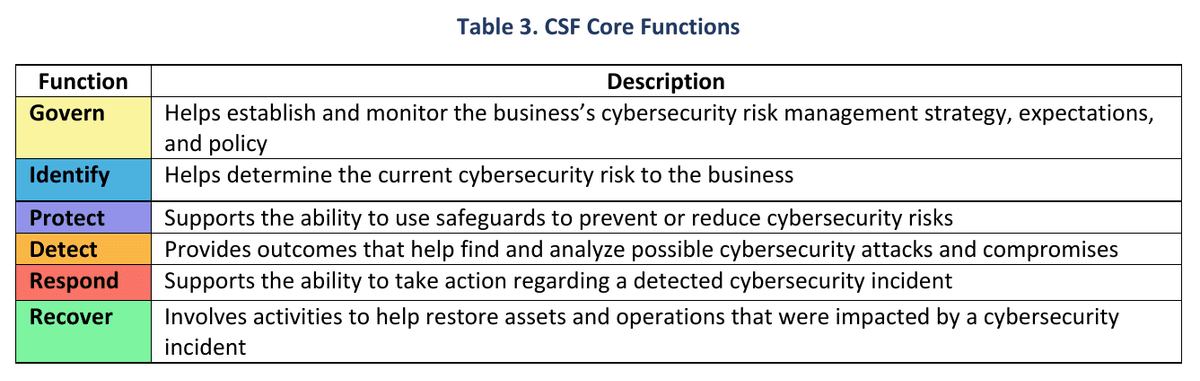
(Source) NIST CSWP 50, Table 3, p.9
All six areas need to be reviewed and checked off one by one, but from the perspective of a sole proprietor, the Govern (Governance and Direction-Setting) function is the most critical. A solo operator has no legal team or IT security team backing them up. When an incident occurs, every legal and financial liability falls squarely on me as the owner. Clients hire me precisely because they are buying responsibility off their own plate.
First and foremost, even though this white paper does not state it explicitly, it is worth assuming that a security incident will eventually happen. That means establishing governance around which regulations apply, what liability arises in the event of an incident, and what insurance coverage you have. With anything involving human beings, it is simply easier to assume things will go wrong at some point.
That is why reducing your own liability exposure matters so much. The modern security baseline calls for delegating core security functions to proven external solutions.
Using OAuth through trusted authentication providers like Google or GitHub is safer than rolling your own auth, just as relying on the security features of major cloud platforms like AWS or GCP is safer than running a home server. (The world's brightest engineers keep those platforms continuously updated.)
Five things you need to lock down and verify yourself, right now
That said, there are still practical security measures you can configure today, at no cost, that are worth checking off.
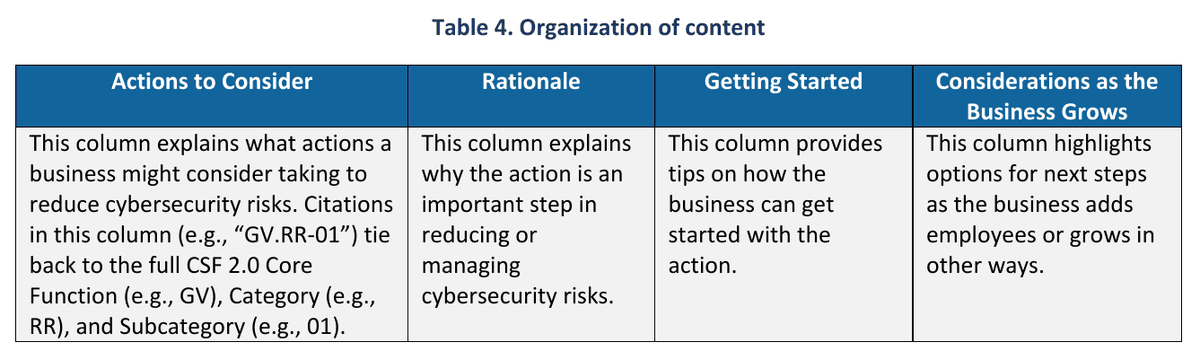
(Source) NIST CSWP 50, Table 4, p.10 / PDF p.14.
1. Lock down accounts with phishing-resistant MFA and least privilege first
The principle is to enable Multi-Factor Authentication (MFA) on every account that supports it, but if you're stretched thin right now, prioritize locking down your email, online banking, sensitive file storage, password manager, core cloud services, and any accounts that access backup data first.
Accounts protected by only a password can be broken by attackers using automated tools, so combining two or more factors from what you know (password or PIN), what you have (smart card or security key), and who you are (fingerprint or face) adds a second barrier. The source document specifically emphasizes phishing-resistant MFA, which keeps authentication intact even if you're tricked by a phishing site, and introduces passkeys as a widely available alternative that lets you log in using a fingerprint or PIN without ever entering a username and password (pp. 2, 15).
(Personally, I think this is a big reason why more and more services these days require passkeys like a YubiKey.)
Wherever you must use a password, use a password manager to generate a unique, strong passphrase for each account, and the introductory guide recommends a minimum length of 15 characters or more (p. 2).
The document explains that the habit of limiting permissions (Principle of Least Privilege, PR.AA-05) should go hand in hand with account protection. If you're doing everyday web browsing or document work under an administrator account on your own PC, you're handing attackers full system privileges the moment malware executes, so routine tasks should be handled under a standard user account.
If you share a computer at home with family members, create separate accounts for them so they can't access your work folders, and when you grant cloud access to outside vendors or collaborators, allow only the permissions needed for that specific task and time period, then periodically review the permissions list. Changing the manufacturer's default admin passwords on IoT devices such as your office router, wireless printer, or smart camera, and recording the new credentials somewhere, is an easy-to-forget fundamental (PR.AA-01, p. 14).
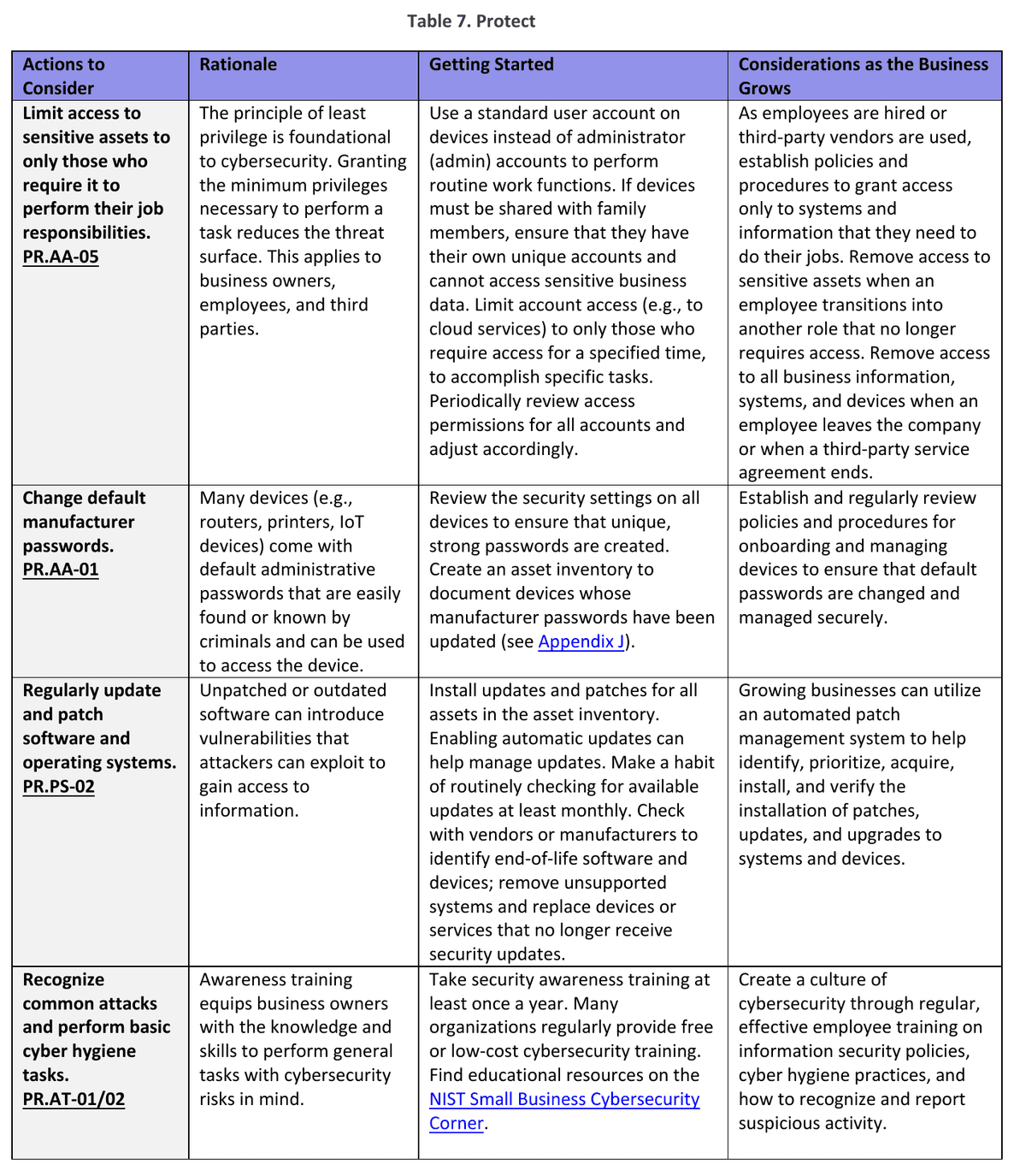
((Source) NIST CSWP 50, Table 7, p.14 / PDF p.18. This is the first page of the Protect table, which bundles together the account and privilege management covered above along with updates and training.)
In short, sole proprietors are advised to keep personal space and professional equipment separate and to maintain distinct permission levels for each account. I'll be honest, though: I haven't gone that far myself. (I don't have much to steal in the first place. I'm a solution delivery vendor, after all.)
2. For backups, the question isn't whether you have them, but whether they can actually be restored
When hardware fails or ransomware strikes, backups are ultimately all you have (PR.DS-11, p. 15). Keep regular copies of important data, and store at least one copy on a medium that is not continuously connected to your primary work device, such as an external hard drive or a separate cloud service, so that if the main machine is infected, the backup isn't encrypted right alongside it.
If you use a cloud service, find out in advance what backup policies and recovery options that provider offers, and above all, periodically do an actual test restore of your backup files. That's the only way to know they actually work.
Even during the recovery phase after an incident (RC.RP.01, p. 20), the order of operations matters. First verify that the backup files themselves haven't been corrupted, then check that you haven't left any backdoors the attacker planted in place, because simply overwriting files with their previous state while leaving those backdoors intact will lead to immediate reinfection. The recommendation is to thoroughly review MFA settings on all accounts, any newly added user accounts, file-sharing scopes, active sessions, and email auto-forwarding rules.
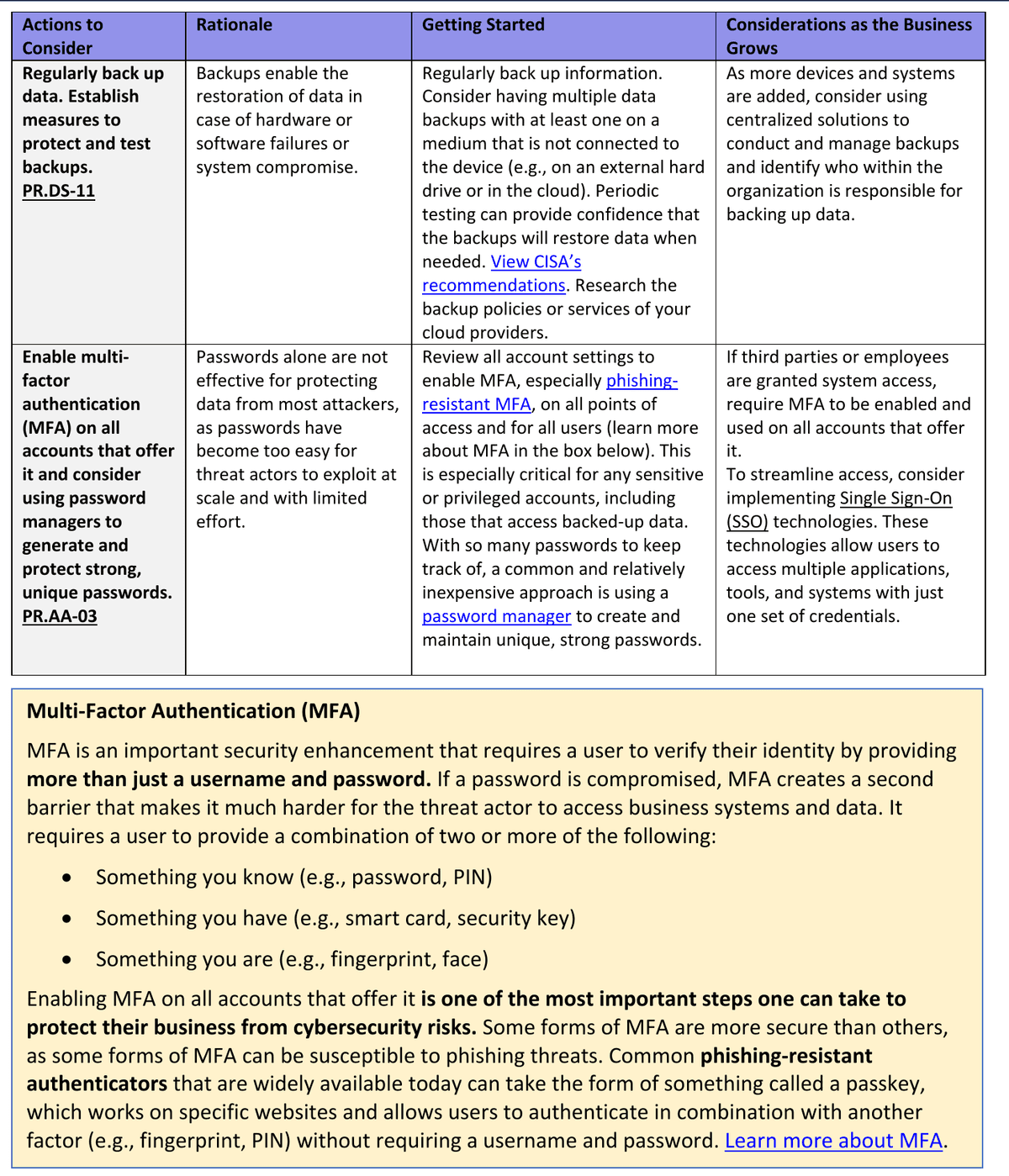
(Source) NIST CSWP 50, Table 7 continued, p.15 / PDF p.19. These are the remaining rows covering backups and MFA, and include the MFA and passkey explanation box immediately below.
In short, run backup tests frequently, and back up your data as often as reasonably possible.
3. With phishing and ransomware, pause for a moment whenever something feels urgent
Phishing is said to be the most common entry point for ransomware into a business, and we should now assume that attackers are using generative AI (the source document uses the notation SI; apparently the Trump administration wants to write AI as SI, which seems like a pointless bureaucratic waste) to craft phishing emails, texts, and social media messages that sound convincingly natural in both tone and context. The common thread across all these attacks is that they pressure you to act immediately, without giving you time to think. They urge you to click a link or open an attachment, and they impersonate vendors or banks to push you into urgently updating payment account numbers, invoice details, or routing numbers.
In these situations, no matter how much a message appears to come from someone you know or a business you deal with, stop what you're doing and check the sender's email address (ask yourself whether it uses a free consumer mail service instead of an official domain), and then verify the matter by reaching out through contact information you already have or an official number, not through any phone number or reply address listed in the message itself.
Defending against ransomware is also not something you can wrap up by trusting a single antivirus program or a single backup. Because cloud accounts and SaaS data are now encrypted and held for ransom alongside local files and network shares, a full defense requires all of the following working together: regular updates (PR.PS-02), always-on antivirus scanning with automatic checks of email attachments and removable drives, operating system restrictions that allow only approved programs to run, login delays and account lockouts to block brute-force password attempts, blocking known malicious domains, IPs, and ports along with domain integrity protection, and isolated backups paired with an emergency contact list.
Attacks like these hit my own website frequently. Let me add a personal note here: it is generally a good idea to link your business operations to a formal company email address. In my case, I occasionally receive requests from agencies abroad, and quite a few of the ones that arrive via Gmail turn out to be fraudulent requests with scripts embedded in PDF files. The most basic requirement for running a business is a professional email address, and what matters is whether you can trust that the other party's email address is equally legitimate.
In that sense, I do feel a certain contradiction about still handling everything through Gmail myself. After purchasing a domain and signing up for Google Workspace (GSuite) is a tip of my own that you won't find in the security documentation. The reason is that Google's spam filtering and security are among the best in the world, so it actually catches fraudulent emails more reliably than you might expect. Either way, I've taken this as a moment for reflection, and I plan to activate a domain I already own.
4. Detection doesn't have to be elaborate
When people hear about catching anomalies (DE.CM, p.18), they tend to picture a large enterprise's 24-hour security operations center, but for a solo operation, simply keeping your antivirus running and enabling every log and alert feature that each service provides by default is an excellent starting point, the document explains.
Turn on alerts for login attempts from new devices, password reset notifications, bank and payment transaction alerts, and notifications for any changes to your domain records, and you'll know the moment someone touches your accounts.
Cybersecurity doesn't stop at the edge of your internet connection either (DE.CM-02, p.18). The risk of theft or shoulder-surfing varies across every physical space where you open your laptop: home, a café, a co-working office, a moving vehicle. Locking your filing cabinet and securing your devices, enabling automatic screen lock when you step away, and setting up location tracking and remote wipe in advance in case a device is lost are all part of detection and protection.
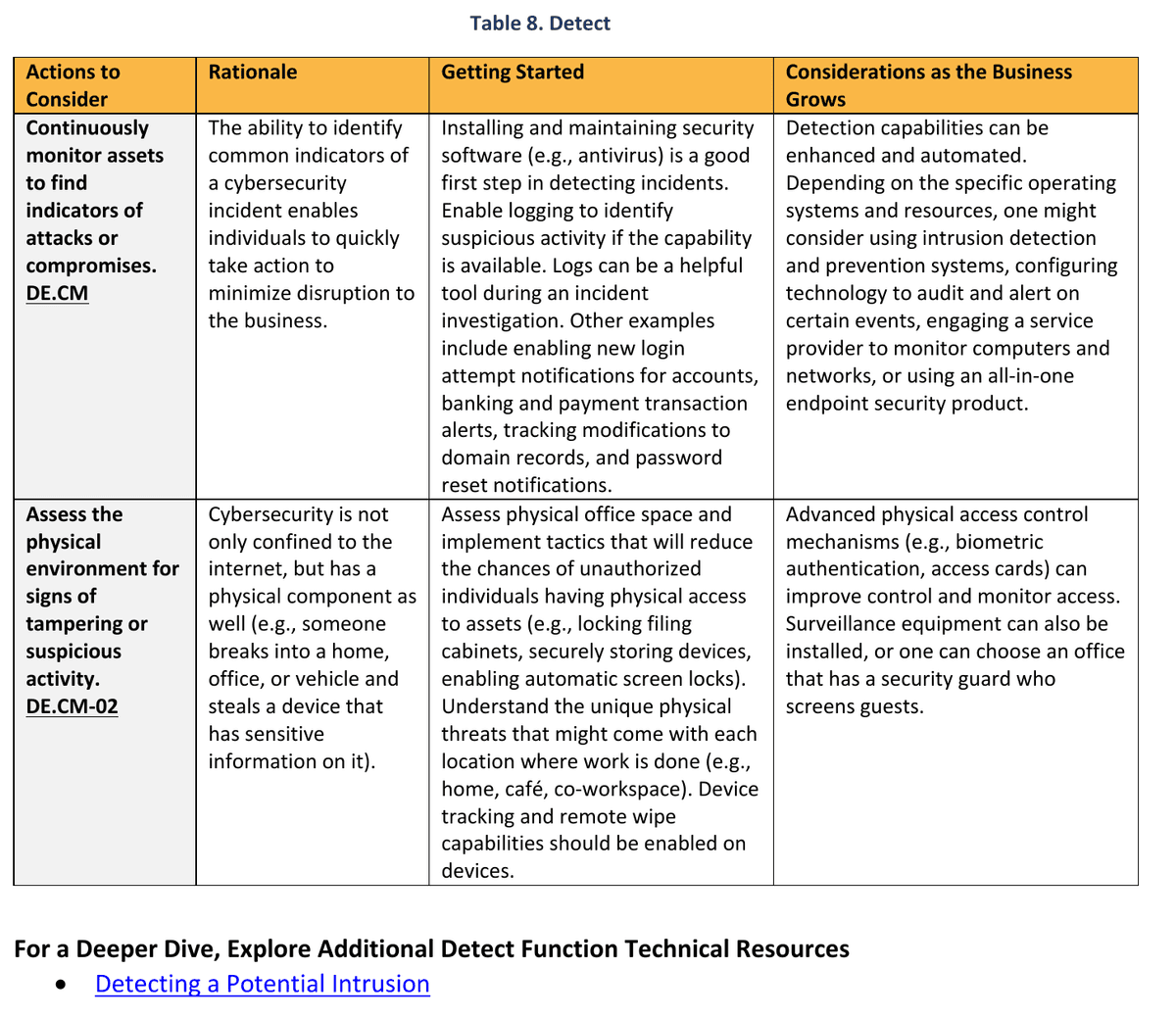
(Source) NIST CSWP 50, Table 8, p.18 / PDF p.22.
5. Write your incident contact list on paper, and isolate systems the moment an incident occurs
When an actual breach hits, your mind goes blank, and to make matters worse, if your work PC or cloud accounts are locked, you can't even access the emergency contacts stored inside them. That's why your emergency contact list and incident response plan, covering law enforcement, legal counsel, incident response specialists, key clients, and your insurer, should be prepared in advance and kept as a printed paper copy or offline backup (ID.IM-04, p.12).
When you discover an actual incident, carefully document the time you first noticed it, the symptoms, security logs, screenshots, and every action you've taken up to that point, then contact the specialists listed in your plan (RS.MA-01, p.19). The basic containment and isolation steps to prevent the damage from spreading (RS.MI-01, p.19) are: unplug the network cable (or disconnect Wi-Fi), isolate the infected device or system, and force-terminate active login sessions. Never use a device or account suspected of being compromised again during recovery.
This is a point where I personally think the security document gets things slightly wrong: in the table, logging (RS.MA-01) and notification (RS.CO) appear in rows above isolation (RS.MI-01), which may lead readers to assume these steps should be carried out in that order,
but that table ordering could be misread as an instruction to keep the network cable plugged in while ransomware is actively encrypting files, writing down every detail, and working through your call list. When you suspect active spread, perform the necessary network isolation without delay. Determine how much to disconnect and link the follow-on steps to your response plan and specialist support (additional reference: CISA Ransomware Guide, Part 2). Also think ahead about business continuity measures, such as manual workarounds, temporary services, or backup communication channels, to keep critical operations running while systems are down. After the situation is resolved, document the root cause, the response process, and lessons learned in an after-action report and incorporate them into your next plan (RC.RP-06, p.19-20).
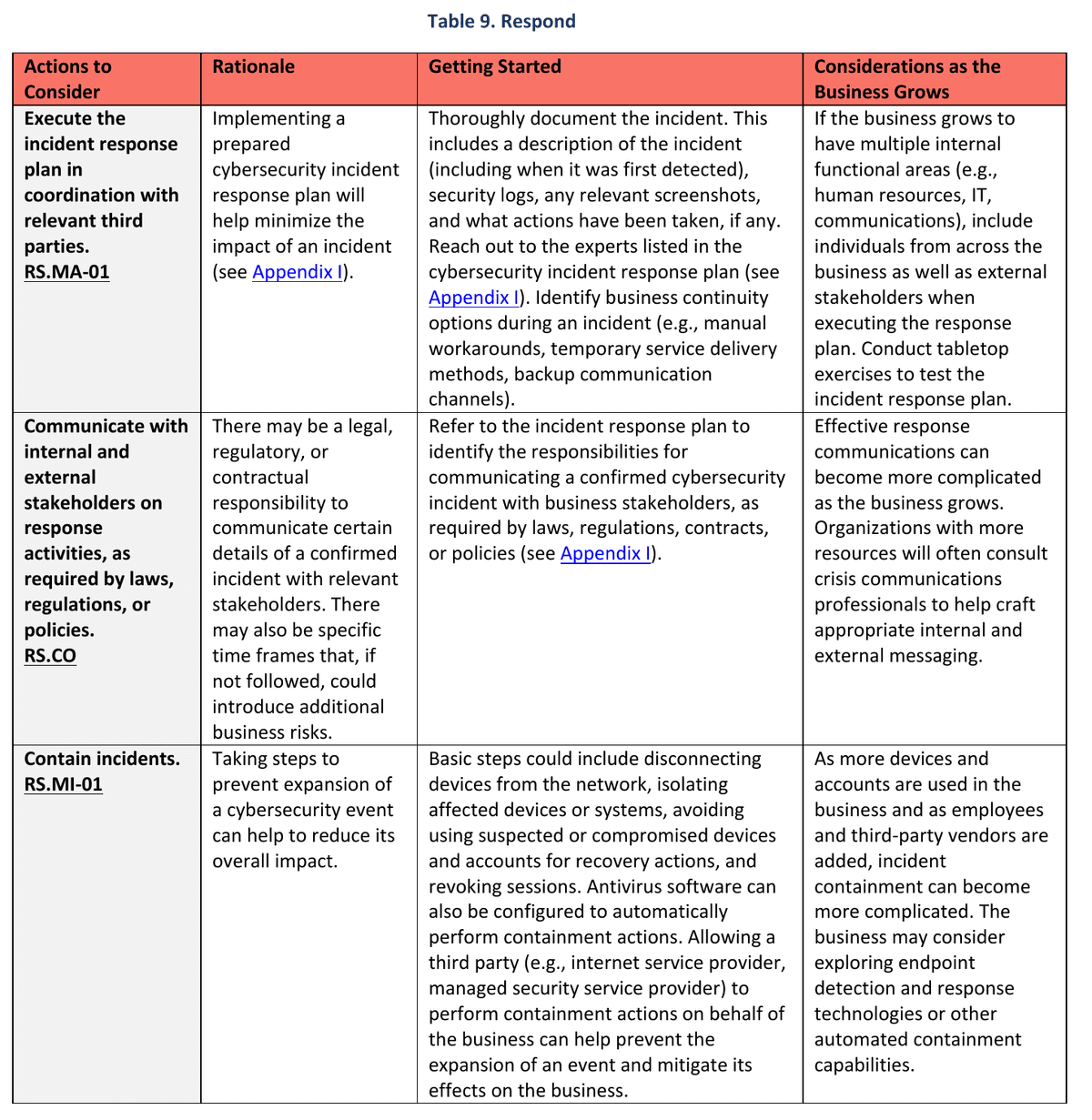
(Source) NIST CSWP 50, Table 9, p.19 / PDF p.23.
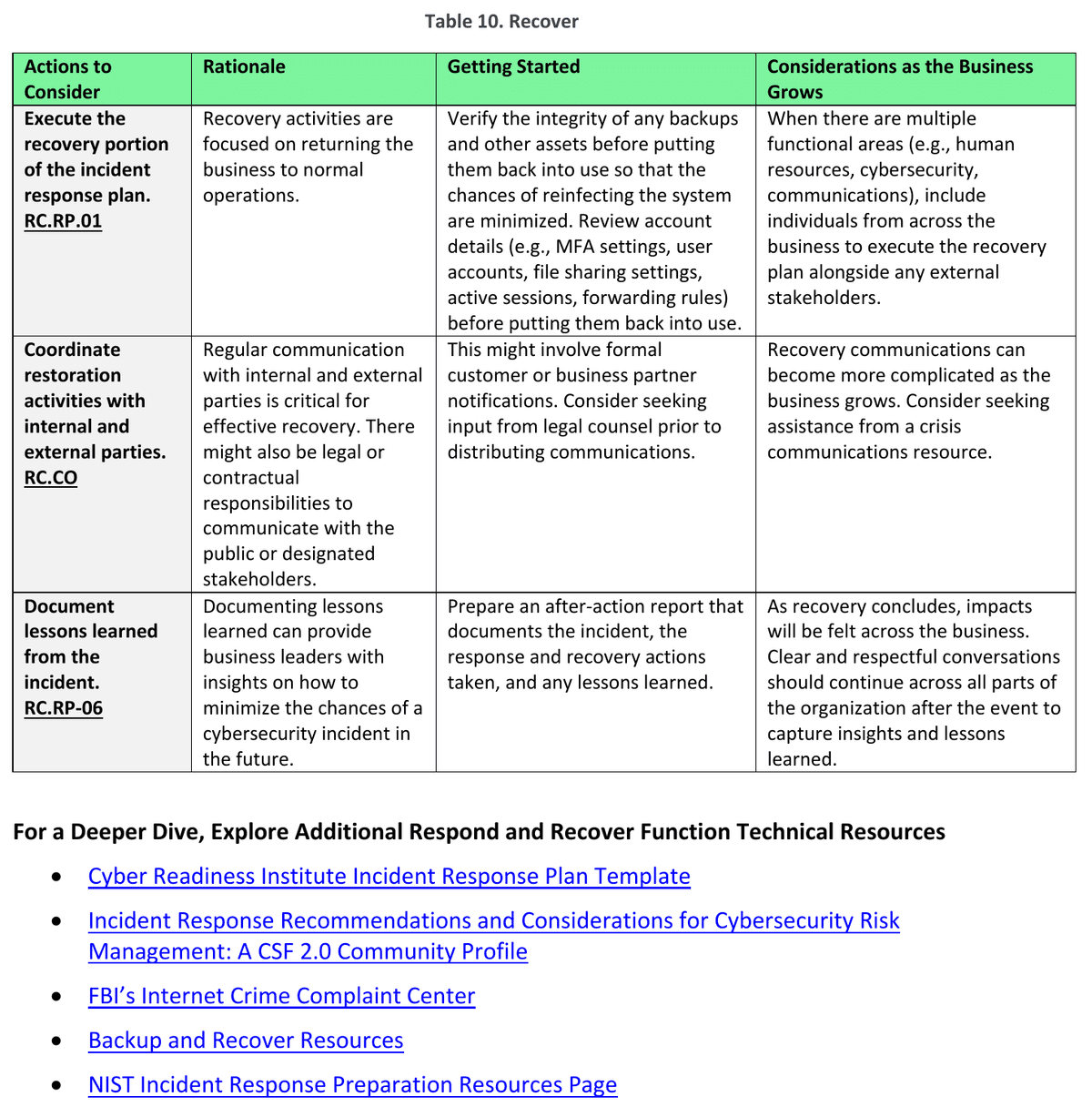
(Source) NIST CSWP 50, Table 10, p.20 / PDF p.24. These are the activities for verifying backup and account status, restoring operations, notifying stakeholders, and capturing lessons learned. References to additional response and recovery resources from the original text have also been preserved.
What's easy to miss when using outsourcing, cloud services, insurance, and AI tools
Solo business owners are especially likely to outsource accounting, website hosting, cloud storage, and even security management itself to external vendors or SaaS providers.
The original document advises that when selecting an outsourced provider, you should start by clearly writing down "what security outcomes I want from this service," then compare multiple vendors' reputations and experience supporting small businesses, and explicitly document service levels, roles, responsibilities, and expectations in your contract (such as an MSA) (GV.SC p.11). The most important sentence is this: "Even if security work is outsourced to an external provider, the ultimate accountability and responsibility for protecting my systems and data does not transfer away from me" (p.6). You should also revisit a provider's security and privacy settings and contract terms periodically, not just once at signing.
Cyber liability insurance (GV.RM, p.11) is similar. It can help by reducing the financial blow of an incident and providing access to security specialists on the insurer's side, but an insurance policy does not substitute for security controls. Determine whether your contracts require you to carry insurance, and if you do carry it, separately document the coverage requirements, exclusions, payout limits, and the minimum security controls you must maintain to keep the policy in force. In particular, if your business scope expands or the assets and vendors you work with change and your risk profile shifts, notify your insurer of those changes so you don't face a coverage dispute over policy terms later (Table 5, p.11; specific notification obligations and coverage scope are governed by the applicable policy terms and law).
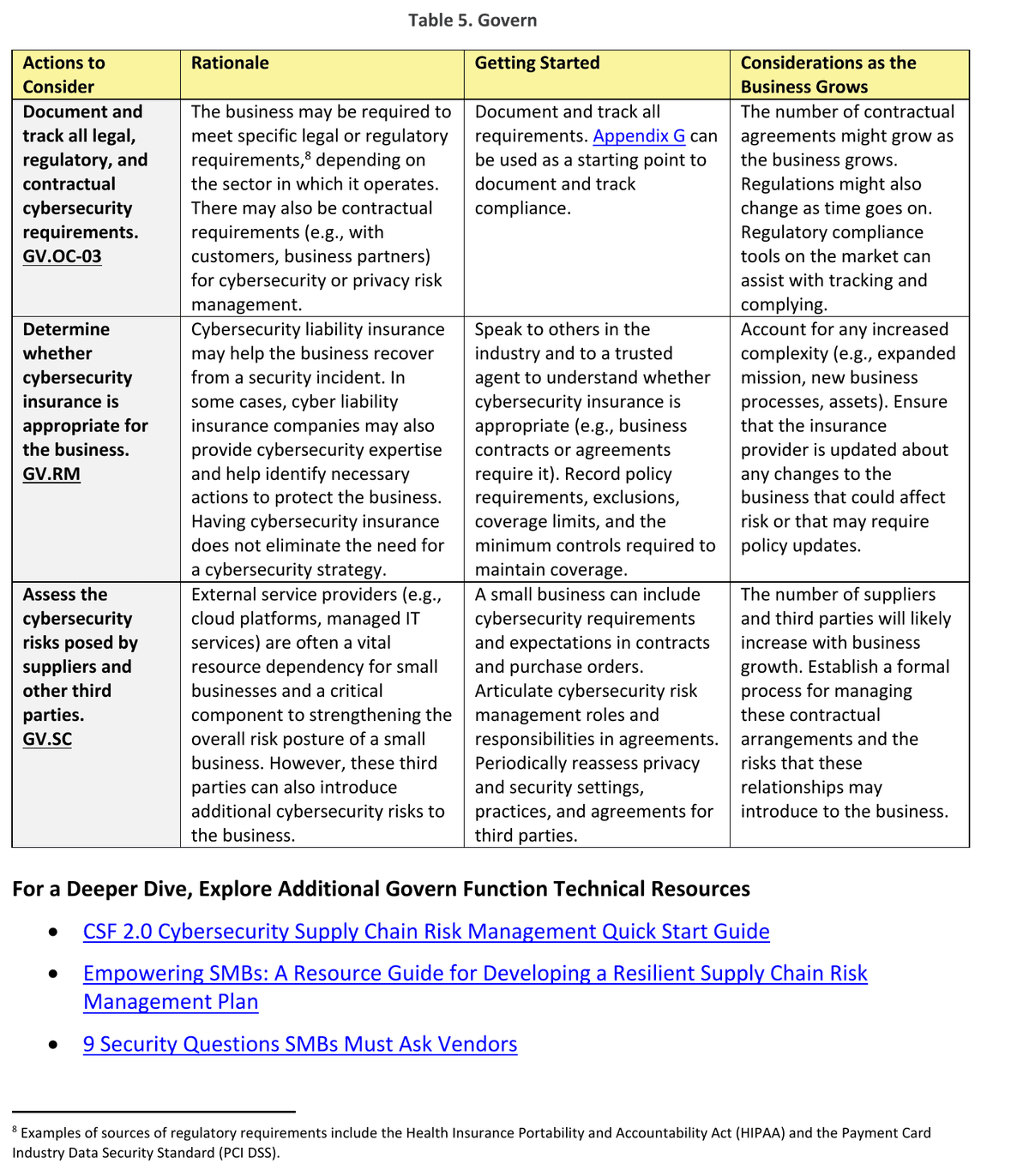
(Source) NIST CSWP 50, Table 5, p.11 / PDF p.15. This covers Govern activities related to legal and contractual requirements, insurance, and external providers, and is personally the section I consider most important.
Section 1.9 (p.7) also dedicates a separate item to the generative AI tools that solo developers and business owners now use as everyday extensions of themselves. Interestingly, the original text labels this section Super Intelligence (SI) rather than AI, but despite the grand name, the substance it covers is the practical security guidance for the AI tools we use daily: code writing, task automation, content generation, and customer-facing AI.
Take inventory of every AI product and service you use, including AI features built into or integrated with existing software, and decide whether to review, configure, or disable each one.
Before putting sensitive material such as trade secrets, strategic documents, health information, source code, or legal documents into a prompt, check that tool's data retention period, whether it uses your data for model training, who has access, and its confidentiality terms.
Put a process in place that requires a human to directly review any code or documents produced by AI before handing them off to clients or partners or using them for important decisions.
Also find out how the external vendors you use are employing AI internally, and in particular, understand how far a vendor's AI systems can reach into your business systems or data.
Beyond this, Section 1.8 (p.6-7, Fig. 3) makes the point that privacy risks can arise on their own even when no security incident has occurred.
This means that even if you've never been breached, using personal information for purposes your customers didn't originally expect, or simply accumulating data for years without deleting it after its original purpose is fulfilled, can itself constitute a privacy violation. For this reason, you should map out the full data lifecycle: what personal information you collect, what you use it for, who you share it with, how you store it, and when you delete it, and configure the privacy settings on your devices and apps accordingly.
As a baseline, U.S. privacy and security regulations tend to be stricter than their Korean counterparts in this area, so it appears appropriate to follow U.S.-side privacy security checks in these cases.
Translated into working notes for a freelance developer:
The original document includes three hypothetical case studies (an attorney, a home-workshop e-commerce seller, and a global marketing consultant) in a separate Excel appendix,
but applying these principles directly to a solo software developer or freelancer context yields the following eight-row checklist.
Records to Keep | Content to Capture | How to Leave a Verification Trail |
|---|---|---|
Business Operations, Risks, and Requirements | Core operations whose disruption would cause serious harm, key risks and planned next actions, and applicable legal, regulatory, and contractual security requirements | Record the relevant provisions, the date reviewed, and whether each requirement applies; leave items not yet assessed marked as |
Assets and Personal Information Flows | Update and end-of-life (EOL) status of work PCs and development tools; collection purpose, location, access, sharing, retention, and disposal paths for deliverables and customer data | Results of cross-checking where representative data travels against actual settings and contracts, along with equipment and accounts to be decommissioned and the deletion actions taken |
Accounts, Permissions, and Recovery | Multi-Factor Authentication (MFA) status for email, domain registrars, Git repositories, and cloud consoles; administrator and external integration permissions; recovery contacts; and login and change notifications | Configuration review date, exception rationale, and permission revocation history. Never write down the actual values of passwords, tokens, or recovery codes. |
Outsourcing, Cloud, and AI Accountability | Scope of file, network, and deployment access granted to external tools and AI; whether data is retained or used for training; review of generated outputs; and responsibility and contact information in the event of an outage or termination | Supporting evidence from contracts and configuration screens, vendor responses, and any terms not yet verified |
Insurance Assessment | Whether cyber insurance is needed, whether client contracts require it, and coverage details including exclusions, limits, minimum control requirements, and notification obligations for business changes | Location of policy terms and results of insurer confirmation. If uninsured, document the rationale for that decision. |
Backup and Restoration Testing | Data covered by backups, storage location of copies (including whether they are isolated), how backup access is protected, and restoration procedures | Date of a test restoration to a separate path that does not overwrite the original, content verification, time required, and any failures encountered |
Incident Response and Recovery Plan | Paper or offline emergency contact list, procedures for logging, isolating, and notifying relevant parties, temporary work methods during system outages, and the order of checks before restoring systems | Note whether the plan is accessible even if your primary account or PC is locked, and document the basis for any legally or contractually required notification deadlines. |
Drills and Improvement | Results of walking through the plan against a hypothetical scenario, including points where progress stalled and what needs to be corrected | The date the plan was last updated and the results of each review. Tabletop exercises, where you mentally walk through the response sequence against a hypothetical scenario, should be recorded separately from actual backup restoration tests. |
- Records to Keep
Business Operations, Risks, and Requirements
- Content to Capture
Core operations whose disruption would cause serious harm, key risks and planned next actions, and applicable legal, regulatory, and contractual security requirements
- How to Leave a Verification Trail
Record the relevant provisions, the date reviewed, and whether each requirement applies; leave items not yet assessed marked as
Unconfirmed.
- Records to Keep
Assets and Personal Information Flows
- Content to Capture
Update and end-of-life (EOL) status of work PCs and development tools; collection purpose, location, access, sharing, retention, and disposal paths for deliverables and customer data
- How to Leave a Verification Trail
Results of cross-checking where representative data travels against actual settings and contracts, along with equipment and accounts to be decommissioned and the deletion actions taken
- Records to Keep
Accounts, Permissions, and Recovery
- Content to Capture
Multi-Factor Authentication (MFA) status for email, domain registrars, Git repositories, and cloud consoles; administrator and external integration permissions; recovery contacts; and login and change notifications
- How to Leave a Verification Trail
Configuration review date, exception rationale, and permission revocation history. Never write down the actual values of passwords, tokens, or recovery codes.
- Records to Keep
Outsourcing, Cloud, and AI Accountability
- Content to Capture
Scope of file, network, and deployment access granted to external tools and AI; whether data is retained or used for training; review of generated outputs; and responsibility and contact information in the event of an outage or termination
- How to Leave a Verification Trail
Supporting evidence from contracts and configuration screens, vendor responses, and any terms not yet verified
- Records to Keep
Insurance Assessment
- Content to Capture
Whether cyber insurance is needed, whether client contracts require it, and coverage details including exclusions, limits, minimum control requirements, and notification obligations for business changes
- How to Leave a Verification Trail
Location of policy terms and results of insurer confirmation. If uninsured, document the rationale for that decision.
- Records to Keep
Backup and Restoration Testing
- Content to Capture
Data covered by backups, storage location of copies (including whether they are isolated), how backup access is protected, and restoration procedures
- How to Leave a Verification Trail
Date of a test restoration to a separate path that does not overwrite the original, content verification, time required, and any failures encountered
- Records to Keep
Incident Response and Recovery Plan
- Content to Capture
Paper or offline emergency contact list, procedures for logging, isolating, and notifying relevant parties, temporary work methods during system outages, and the order of checks before restoring systems
- How to Leave a Verification Trail
Note whether the plan is accessible even if your primary account or PC is locked, and document the basis for any legally or contractually required notification deadlines.
- Records to Keep
Drills and Improvement
- Content to Capture
Results of walking through the plan against a hypothetical scenario, including points where progress stalled and what needs to be corrected
- How to Leave a Verification Trail
The date the plan was last updated and the results of each review. Tabletop exercises, where you mentally walk through the response sequence against a hypothetical scenario, should be recorded separately from actual backup restoration tests.
When starting out, resist the urge to do everything at once. Begin by writing down a list of your core assets and accounts, then lock down MFA, recovery options, and permissions for your key accounts, run one backup restoration test, and create a single offline contact sheet. You are already halfway there as long as you avoid two common misconceptions: believing that having a OneDrive or Google Drive sync folder running counts as an independent backup that protects you from Ransomware, or thinking that writing "do not read sensitive files" in an agent config file (AGENT.md or CLAUDE.md) actually isolates your filesystem or network permissions. What matters is genuine, real isolation.
That said, I personally think this is a somewhat idealistic scenario. In practice, the more accurate approach is to isolate only the parts where a breach would put significant liability on you. Isolating everything sounds good in theory, but it means you have to check and manage the isolation boundaries every single time you work, which is effectively impossible for a solo developer.
This is a checklist published in the United States, specifically aimed at sole proprietors, and it is what prompted these thoughts.
To some extent it reads as bureaucratically safe, covering only what is unambiguously defensible, and while parts of it are genuinely useful to practitioners, other parts are idealistic and inconvenient. Then again, security tends to begin with inconvenience, so that is somewhat inevitable. Some sections were genuinely helpful. Ultimately, knowing something and actually doing it are different things, so as a tool for putting principles into practice, this white paper is quite valuable.