
When most people hear the word "cookie," they think of a baked treat.
Programmers, unfortunately, are a different breed: the word "cookie" instantly conjures up "a 4 KB key=value thing embedded in the browser," and when they spot a delicious cookie at a bakery, they're the type to ask, "Can this maintain a session?" There are many reasons programmers get stereotyped as nerds, but the tradition of their predecessors hijacking everyday words and repurposing them with bizarre technical meanings certainly plays a significant part.
Which naturally raises the question: why on earth did those earlier programmers reach for the name of a snack? And what exactly is the "Session" that cookies are supposed to maintain? Why did they pick a food name, guaranteeing that every time a junior developer searches for the programming term "cookie," they get bombarded with photos of baked goods?
To understand this, set the word "cookie" aside for a moment and start with the concept of State.
State is information that persists from past events and changes what happens next. If you added a keyboard to your cart on a product page, the current state is "there is a keyboard in the cart," and the checkout page must read that state to calculate the keyboard's price. Whether you're logged in, what order you're placing, or which language you've selected all qualify as state, because a previous choice changes the result of the next request.
Whether state is stored in memory, a database, or the browser is beside the point for now. What's the real problem?
HTTP has no memory of what you just did. It suffers from a carefully engineered amnesia that completely erases the context of every prior request.
You added a keyboard to your cart and navigated to the checkout page, but from the server's perspective, all it knows is "someone is asking for the checkout page."
This is HTTP's Statelessness. It doesn't mean you can't use a database. It simply means every request must carry everything it needs to say for itself. You cannot rely on implicit context like "you know, that thing from before" carried over from a previous request.
Here's an example. I added a keyboard to my cart.
Then I navigated to the checkout page (/checkout). From HTTP's perspective, these two requests are complete strangers to each other. There is no recognition like "oh, that same customer again." The server receiving the second request knows "someone wants the checkout page," but has no way to pull out my cart from among the countless carts out there.
In the early days of the web, this was fine. You served a document and that was the end of it. But as applications emerged that required logging in, filling a shopping cart, and picking up where you left off, this amnesia became a real problem. Someone had to bridge the gap.
The concept that emerged to bridge that gap is the Session. HTTP still remembers nothing, but the application insists, "these requests are actually part of the same activity."
A Session is, in short, a logical context that ties multiple independent HTTP requests together into a single flow. You could define a session as everything from login to logout, or as the entire process of adding items to a cart and completing checkout without ever logging in. The application gets to decide the boundaries. Because HTTP doesn't conjure up sessions automatically, the application is entirely responsible for when a session starts and ends, and what gets remembered during it. There is no guarantee that a single TCP connection maps to a single session, and there is no rule that a browser tab equals one session.
But creating a session isn't the end of the story. At any given moment, a server has countless login sessions and anonymous carts all tangled together. A new request arrives. The server needs a way to answer the question, "So whose session is this?" That's where the Identifier comes in.
An identifier is simply "a marker that singles out one thing from many." It doesn't have to be a real name, and it doesn't have to be an account. The same person can carry different identifiers in their browser and their app, and it's perfectly normal for an identifier to be attached to a cart with no login at all. A value like 7f41c0a9 doesn't mean "a person named 7f41c0a9"; it means "hey server, fetch the session record stored under the key 7f41c0a9."
Mapping this back to the cart example: the fact that a keyboard is in the cart is the state; the context that links multiple requests together so the same cart keeps being used is the session; and 7f41c0a9 is the identifier used to look up the session record stored on the server. The remaining problem is how to carry that identifier along with the next, stateless HTTP request, and cookies fill that final blank.
So how can the server get the identifier back on every subsequent request? The server can hand the value off to the client and get it back on the next request, but the challenge is what basis the server has for recognizing "that same client from before." IP addresses change quickly and multiple people can share one, so they can't be trusted. A connection can be dropped or reused, and it doesn't reliably correspond to a single user session, so it can't serve as an identification mechanism either.
What the web ultimately needed was a common method by which the browser would automatically store per-server values and return them on subsequent requests. Among the available approaches, cookies were a straightforward solution: the server issues a value saying "I'll remember you by this," the browser holds onto it, and from then on automatically sends it back with every relevant request. That is the reason cookies came to exist.
A cookie is a mechanism that implements this round-trip rule using HTTP Headers. The basic form is simple: one name=value pair, that's all. The name is a label that identifies what the cookie is for, and the value is the actual content the server will use.
Using the earlier example, it looks something like this.
cart_id=7f41c0a9cart_id is the name, and 7f41c0a9 is the cart identifier. When adding the keyboard to the cart for the very first time, there is no identifier yet, so naturally the request carries no Cookie header.
POST /cart/items HTTP/1.1
Host: shop.example
Content-Type: application/x-www-form-urlencoded

item=keyboard
The server receives this request and thinks:
"Ah, a new visitor. I need to create an identifier first."
It creates the identifier 7f41c0a9 and stores the cart state under it. Somewhere in server memory, a record like this is born.
cart_store["7f41c0a9"] = ["keyboard"]
Then, while sending back the response, the server makes a request of the browser.
"Take this, hold onto it, and send it back every time you come here."
HTTP/1.1 200 OK
Set-Cookie: cart_id=7f41c0a9; Path=/; HttpOnly; SameSite=Lax
When the browser receives Set-Cookie, it stores cart_id=7f41c0a9, keeps track of the applicable scope, and the next time the user navigates to /checkout, it automatically attaches the cookie like this. (That is, it adds the Cookie header to the next request that meets the conditions.)
GET /checkout HTTP/1.1
Host: shop.example
Cookie: cart_id=7f41c0a9
The server finds cart_id in the request and thinks: "It's that visitor from before. 7f41c0a9... found it, the cart with the keyboard!"
The server sees the name cart_id, recognizes that a cart identifier has arrived, uses the value 7f41c0a9 to look up the session record created earlier, and reads the cart state stored within it.
There is one important point here. The browser has no idea whether 7f41c0a9 is a cart identifier or a login session. It simply checks the label, and if the conditions match, hands the value over. The meaning of that value is determined entirely by the server application. The same goes for attributes like Path, Domain, Secure, HttpOnly, SameSite, and expiration time. They have nothing to do with the meaning of the value; they are rules that only tell the browser "when and where to send this cookie."
That said, a cookie's value is not always an identifier. Sometimes it carries the setting itself directly, like theme=dark. However, when dealing with important state such as login sessions or shopping carts, it is generally better practice to entrust only a hard-to-guess identifier to the browser and keep the actual data on the server.
Any value entrusted to the browser can be tampered with and sent back by the user at will. The server must therefore never mistake a cookie value for "trusted internal data." Session identifiers in particular are simply keys for looking up server-side records; it is far safer not to embed sensitive information in the value itself.1
Now let's pull together the concepts that have been scattered throughout.
State: information that must be preserved across interactions
Session: the logical context in which that state is used across multiple requests
Identifier: the value that locates your particular session among many
Cookie: an HTTP state management mechanism that entrusts an identifier or small piece of state to the browser and gets it returned on the next request
To summarize: State is information that must be preserved across interactions; a Session is the logical context in which that state is used across multiple requests; an Identifier is the value used to locate one session among many; and a Cookie is the HTTP state management mechanism that stores that identifier or small piece of state in the browser and gets it returned on the next request. The currently published standard is RFC 6265, and its successor document has been assigned the number RFC-to-be 10025 and is currently in the RFC Editor's final review stage.
The conceptual overview is done. Now let's look at the history of cookies.
The customer vanished when the page turned?
HTTP is a thoroughly stateless protocol. As Section 3.3 of RFC 9110 puts it, the meaning of each request message must be understandable in isolation, independent of any other request. Just because two requests arrive back-to-back on the same TCP connection, the server must not assume "oh, this is the same person from earlier" — each request must be treated independently. The internet operates under this principle as established by HTTP.
There is a point of confusion that trips people up here: questions like "if it's stateless, why does the server use a database?" Statelessness does not mean the server cannot use memory or must disconnect from a database; it means that an HTTP request does not automatically carry forward information such as "I am currently logged in" from a previous request.
In other words, stateless does not mean the server must not have a database or memory. It means that an HTTP request itself does not automatically bring along the application state from a prior request.
Even keep-alive, which holds a connection open for an extended period, does not create a logged-in state. Keeping the phone line connected does not mean the support agent suddenly knows what is in the customer's shopping cart.
This advantage of request independence was formalized as an even stronger constraint in REST: Fielding explained that REST's stateless constraint prevents the server from retaining state between requests, thereby improving reliability and scalability. After processing one request, the server can release the associated resources quickly, and if a partial failure occurs, other components can pick up a single request and continue without prior context.
When a person cannot remember a conversation they just had, they should see a doctor; when a server does the same thing, it gains scalability.
In the early web, this property was not much of a problem. A client requested a document, the server sent it, and that was the end of the interaction.
The problem surfaced in the summer of 1994, when Netscape's shopping server team set out to implement a shopping cart and this property immediately became an obstacle. A user would select items on a product page, but once they moved to the checkout page, the server receiving that next request had no shared mechanism to know what the person had chosen moments before.
How to carry state without cookies
Even before browsers automatically returned values, there were ways to do it. One approach was to append a session identifier to every URL.
GET /cart?session_id=7f41c0a9 HTTP/1.0When passing through a form, the identifier was placed in a hidden field.
<form action="/checkout" method="post">
  <input type="hidden" name="session_id" value="7f41c0a9">
  <button type="submit">Payment</button>
</form>
This approach requires the application to continuously embed the identifier in every link and form. If a single intermediate page omits the value, the user becomes a stranger.
As OWASP notes, a session ID embedded in a URL can be exposed through links, logs, browser history, bookmarks, the Referer header, and search engines. In systems where the session identifier also serves as an authentication credential, anyone who receives a product link also receives the logged-in session along with it — meaning early websites essentially offered a remarkably radical collaboration feature: sharing content and delegating access rights through a single URL. If that still sounds abstract, consider this concrete scenario: you are logged in on a site that uses this approach, and you copy a link to send to a friend.

Your friend can access not only your shopping cart but also your purchase history, and quite possibly the list of adult items reflecting your more private tastes that you assembled for a steamy night. To be fair, a men's spandex fursuit is not necessarily a shameful preference, but it is also not the kind of thing most people share openly.
Appending an identifier to URLs introduces yet another headache: caching.
On the web, a cache is an intermediary store that saves resources so they do not have to be downloaded repeatedly. The criterion a cache uses to decide whether two resources are the same is the URL. If the URLs differ, the cache treats them as different documents even if the content is identical.
Once values like session_id=7f41c0a9 start appearing in URLs, problems arise. Because each user gets a different URL, a page like /product/keyboard that could be served identically to everyone is treated by the cache as a distinct document for each URL. The same product page ends up stored in the cache once per user, cache efficiency collapses, and CDNs cannot do their job.
This is also one of the reasons RFC 2964 recommended separating Session State from URLs.2 The goal was to prevent caches from wastefully holding multiple copies of the same resource.
User experience problems compound on top of that. The more interactions a user has — navigating between pages, filling out forms, clicking links — the more places the application must inject the identifier into every path. If even one is accidentally omitted, the user suddenly appears to be logged out or finds an empty shopping cart. And given how rough the development tooling was at the time, such mistakes must have happened fairly often.
From the developer's side, it was the hellish grunt work of embedding identifier-injection code into every template and redirect; from the user's side, it was the mystery of their state vanishing for no apparent reason.
What everyone ultimately wanted was something simple: a rule where the browser automatically remembers a small value per server and attaches it to every request made to that server. Developers would no longer need to append an identifier to every link, users could copy a URL without their entire session tagging along, and caches could use URLs normally. It was, in hindsight, an obvious mechanism — one that just wasn't obvious at the time.
1994: Netscape entrusts the browser with a note
According to Lou Montulli's 2013 retrospective, around July 1994 another team at Netscape brought him a shopping server and shopping cart problem. At the time, a proposal was circulating to embed a permanent identifier in each browser — a structure where any site could see the same identifier. Montulli opposed it because it could be used for cross-site tracking.
His approach was to have the server generate a value and have the browser send that value back only to the originating site. Session identifiers were the initial focus, but the concept soon broadened into a general mechanism for passing small payloads.
The Netscape browser shipped with this feature in the fall of 1994, and an unofficial cookie specification was published so that other browsers and websites could implement it. The basic exchange from that era is almost identical to what we use today.
The actual exchange is surprisingly simple: the server sends a single line in the response header.
HTTP/1.0 200 OK
Set-Cookie: session_id=7f41c0a9; Path=/
"Hey, remember this value session_id=7f41c0a9. And from now on, attach it to every request under /." The browser receives this instruction and stores the value.
The user knows nothing about any of this. They just click a link as usual, only this time the browser quietly attaches the cookie in the background.
GET /checkout HTTP/1.0
Cookie: session_id=7f41c0a9
The server pulls session_id from the request and looks through its own storage to find the session data associated with that identifier. Somewhere in memory, there is a record like this.
session_store["7f41c0a9"] = {
    user_id: 42,
    cart: ["book", "keyboard"]
}
Now the server can say "it's that person from before" and resume showing their shopping cart. If the user copies the URL and shares it, the session does not travel with it; there is no need to manually append an identifier to every URL; and the cache can use URLs normally.
By the way, 7f41c0a9 used in the example is a short value chosen purely for illustration. (I asked my one and only friend Mr. ChatGPT to throw together a few sample code snippets, and this is what it came up with, so please don't read too much into it.)
In a real service, you should never use an identifier this short. It must be a sufficiently long, unpredictable random value so that an attacker cannot guess it by brute force; otherwise, someone could guess another user's session, intercept it, and that leads directly to account takeover.
You could store the entire shopping cart in a cookie, but in the common server-side session approach, only an unpredictable identifier is stored there. The server owns the canonical record of the logged-in user and their cart. The browser simply carries the identifier.
This is worth emphasizing repeatedly: cookies and sessions are not the same thing. A cookie is the value and the rules by which the browser stores and transmits it; a session is an application-level concept that ties multiple requests together into a single user context. You can implement a session without cookies, and you can store something like a language preference in a cookie without any session involved.
So why were they called cookies?
But why, of all things, was it called a "cookie"? What were those early programmers thinking when they attached that name to a technology that has nothing to do with something you eat?
Surprise! The answer to that question is: nobody knows.
To be more precise, we do know where the web cookie got its name, but why the earlier computing term magic cookie was called a "cookie" in the first place remains unclear.
The term most directly confirmed as a predecessor to the web cookie is magic cookie. A magic cookie is an opaque value that one program hands to another. The receiving side makes no attempt to interpret its internal structure or meaning; it simply holds onto the value and returns it as-is to the issuer when needed later.
"You don't need to know what this means. Just keep it safe and hand it back when I ask for it."
This closely resembles how web cookies work, where an opaque session identifier is entrusted to the browser and returned with the next HTTP request. That said, not every web cookie is an opaque value; a cookie can also directly carry a small, legible piece of state, like theme=dark.
Just how old this term really is can be confirmed in the 1979 UNIX V7 Programmer's Manual entry for fseek.
That manual explains that the file position value returned by ftell() is measured in bytes on UNIX, but on other systems it may be a magic cookie. Such a value should not be interpreted or used in arithmetic; instead, it must be passed back as-is to fseek() when restoring the file position.3
Even back then, the concept of "a value that the receiver shouldn't question but simply return" was already being called a "cookie."
Rendered in modern C form for clarity, it would look something like this.
long cookie = ftell(stream);

/* Other Read Operations */

fseek(stream, cookie, SEEK_SET);
Here, the variable name cookie is used for illustrative purposes, and the key point is that cookie + 1 does not necessarily refer to the next file position.
You must not pretend to know the internal meaning of the value; you must return it exactly as received to the API that issued it.
In the 1979 manual at least, values like this were already being called magic cookie. The current Jargon File likewise describes it as an opaque identifier with no defined internal structure, passed back later to the same or a different program.4
The people writing that manual were already calling such values "magic cookies," and the name already reflected a computing convention: an opaque value that you store without asking questions and return unchanged. This was at least 15 years before HTTP cookies appeared.

Montulli wrote that he recalled magic cookie from a college operating systems course and chose the name cookie because it resembled how the web worked. In a 2022 AMA, he explained that both the expression he had seen in an old operating systems manual and the image of a fortune cookie, with a small message tucked inside, had influenced his choice of name.
The exact name of the manual he read was not well preserved in history, but in any case, the cookie used on the web derived from the magic cookie, and why the magic cookie itself came to be called a cookie is something nobody knows.
Implementation First, Standard Later
As with so many specifications in the programming world, cookies had a working implementation before they had a standard. Nobody sat in a conference room designing a perfect specification and then built it into a browser. Netscape created an informal spec in 1994 with a "let's just do it this way" attitude and shipped it in their browser. RFC 1945, which documented HTTP/1.0, wasn't published until 1996, two years later. Cookies were already running on countless websites, and the standard was playing catch-up.
When the Standard Tried to Correct Reality and Failed
In 1997, the IETF published RFC 2109 and elevated cookies to an official standard. The title itself was ambitious: HTTP State Management Mechanism. The document explained how Cookie and Set-Cookie headers could tie multiple HTTP requests together into a single stateful session. The session it described wasn't about holding a TCP connection open; it referred to the logical context that carries the choices of a previous request into the next one, such as a shopping cart or a login.
But it didn't stop there. In 2000, the IETF published RFC 2965, proposing new headers called Cookie2 and Set-Cookie2. The specification was more sophisticated than the original cookies, and in theory it was excellent. The problem was reality. Neither browsers nor servers properly implemented the new spec. The standard was perfectly fine; nobody used it. Interoperability became a mess, and Cookie2 and Set-Cookie2 quietly faded into obscurity.
When Reality Became the Standard
In 2011, the IETF changed strategy entirely. The approach taken in RFC 6265 was straightforward: "Let's document exactly how Cookie and Set-Cookie actually behave on the internet today." The standard was no longer trying to correct reality; it chose instead to accept reality and record it as-is. Cookie2 and Set-Cookie2 were formally deprecated. The standard had tried to correct reality and failed, so the next standard simply documented it. That is how things often go: an ambitious specification gets written, it usually fails, and the culture in the field rewrites the document.
And Today
RFC 6265 is still active. Its successor, RFC 6265bis, has already passed IESG approval and moved to the RFC Editor; as of August 5, 2026, when this post was last updated, it has been assigned the number RFC-to-be 10025 and is awaiting final publication. So RFC 6265 has not yet been officially retired. When the new document is published, it will formally incorporate modern browser security behaviors such as SameSite and Cookie Prefixes. The small feature that Netscape dropped in with a "let's just do it this way" attitude in 1994 has been evolving for more than 30 years and is still on the agenda in standards meetings.
Shopping Carts and Trackers: The Dark Side of Cookies
Montulli's original goal included an intention to avoid a common browser identifier that could travel across sites. A cookie was supposed to be a value exchanged only between a specific server and the browser visiting that server. But a web page doesn't fetch HTML only from its own server. Resources like images, fonts, and ad banners are loaded from entirely different servers.
<img src="https://ads.example/pixel.gif" alt="">That single fact changed everything. Whether a user is reading a news site or browsing a shopping mall, if both pages embed a resource from the same ads.example, the browser faithfully sends ads.example's cookie with every one of those requests. The news site and the shopping mall have no relationship with each other, but from the ad server's perspective they do. This user just read the news, and now they're shopping. The browser was submitting an attendance sheet without a second thought.
Montulli later recalled that the combination of embedded content and cookies was a problem he had overlooked at design time. By around 1996, ad tracking through third-party cookies had become a controversy. A mechanism built to remember users had begun to be used to remember where users had been.
Not Everyone Is Affected the Same Way
This mechanism does not work the same way in every browser today. Safari has blocked third-party cookies by default since 2020, and Firefox has shipped Total Cookie Protection by default since 2022, partitioning cookie storage per top-level site. So even if the same ads.example appears across multiple sites, in these browsers it is no longer straightforward to link visits using a single global cookie as before.
On top of that, Chrome pivoted in July 2024 away from a blanket deprecation of third-party cookies toward giving users more choice, and in April 2025 announced it would maintain its current approach without introducing a separate new choice prompt. Then in October of the same year, it announced it would wind down most Privacy Sandbox technologies, including Topics, Protected Audience, and Attribution Reporting, while retaining CHIPS, FedCM, and Private State Tokens.
In short, how third-party cookies behave in 2026 varies depending on the browser, user settings, and whether storage partitioning is in effect. The tracking structure described above only holds in environments where third-party cookies are neither blocked nor partitioned.
You Are the Product
Just how dangerous that environment is becomes clear from investigations by public authorities. Data brokers examined by the U.S. FTC in 2014 were aggregating bankruptcy records, purchase histories, and web browsing histories from multiple sources and merging them into detailed profiles of individual people. Seven of the nine brokers investigated were also exchanging data with other data brokers.
The UK ICO's investigation into real-time advertising auctions reveals even more unsettling details. It noted that records of website visits and even traces of health-related searches could be included in ad bidding data, and that a single auction could expose personal information to hundreds of organizations. The entire process completes in milliseconds. Google Authorized Buyers' metrics documentation states a bid response timeout of 120–300 ms, and the developer RTB testing guide explains that the limit is generally 80–1000 ms depending on auction format and is communicated via BidRequest.tmax.
The depression article you read, the bankruptcy procedure you searched for, the time you spent on an adult products site — all of it is now merged into one massive identification profile. During the few hundred milliseconds it takes to auction off a single ad slot, that profile is laid out before hundreds of organizations. You are no longer the subject browsing the web; you are a perfectly quantified data commodity fed into a real-time bidding system.
But at least, we've been spared the terrible tragedy of the keyboard you added to your cart disappearing the moment you turned the page.
Of course, even today I'm busily ruining the average data profile of an Asian man in his thirties by casually searching for spandex furry suits and hobbies I'd rather not name. From an advertiser's perspective, is the search history I generate noise, or a new target segment? Either way, it doesn't matter. Perfect profiling is nothing but a statistical headache when it runs up against my search history. If polluting data counts as a form of resistance, then I'm fighting pretty hard today.

How to Bake Cookies Safely
Up to this point I've been talking from the perspective of someone who eats — well, receives — cookies; now it's time to talk about baking them.
Unfortunately, the programming profession is often fated to programmers are often condemned to bake cookies they will never taste and serve them to browsers instead. And if you bake these cookies badly, they cause food poisoning in the form of session hijacking. So let's learn how to bake them properly.
Early cookie rules were simple. Just like tucking chocolate chips into dough, all you had to do was put a name=value pair in and you were done. But as cookies started being used for login sessions and user tracking, the conditions governing when and to whom a cookie should be presented kept growing. Now there's no shortage of things to consider when baking even a single cookie.
Let's start by distinguishing the basic ingredients. Set-Cookie is the HTTP header the server puts in a response — it's the waiter saying, "Here, have this cookie." session=opaque-id is the cookie's name and value, essentially saying, "This is a cookie named 'session,' and inside it is a value called opaque-id."
The Secure, HttpOnly, SameSite, and Path attributes that follow after semicolons are the handling instructions — "Please treat this cookie as follows."
It's worth keeping in mind that these are not JavaScript commands you run in the browser console. An order that works only in the kitchen doesn't necessarily work out in the dining room where the guests are.
Of course, adding a few attributes doesn't make a session fully secure; generating and rotating session identifiers, revoking them on the server side, and defending against XSS and CSRF are all separate concerns. Covering all of that is beyond the scope of this post, so I'll leave those topics aside and focus here on the basic safeguards that restrict where and when a browser stores and transmits cookies.
Secure, HttpOnly, SameSite
Secure restricts cookie transmission to secure connections only. It does not sign the cookie value or encrypt its contents. The name sounds confident, but what it actually does is specify the delivery route.
HttpOnly excludes cookies from non-HTTP APIs such as document.cookie. It makes it harder for browser scripts to directly read session cookies, but the browser continues to attach the cookie to HTTP requests that meet the conditions.
OWASP likewise makes the boundary clear: HttpOnly protects the confidentiality of the cookie value. An attacker who can execute a script from the same origin via XSS can send requests using the already-authenticated browser even without being able to read the session ID. Enabling HttpOnly closes one path by which an attacker could steal the session cookie, which is a welcome improvement, but it leaves open the path where the attacker simply uses the cookie in place without stealing it.
SameSite restricts the conditions under which cookies are sent on requests that originate from a different site. It is a defensive layer that reduces CSRF risk, but it does not automatically replace server-side CSRF tokens or request validation.
Today's Popular Recipe
The three attributes each do different things, but for a login session cookie they typically appear together. In practice, the one-liner a server sends looks like this.
Set-Cookie: session=opaque-id; Secure; HttpOnly; SameSite=Lax; Path=/Breaking that single line down ingredient by ingredient:
Part | What the browser reads | Kitchen analogy |
|---|---|---|
| The server is asking the browser to store a cookie as part of its response. | "Here's a cookie for you, guest!" |
| This is a cookie whose name is | The cookie name printed on the wrapper and the contents inside it. |
| Send this cookie to the server only over a secure connection. | "Please deliver this cookie only via a safe route." |
| Prevents the page's JavaScript from reading this cookie via | "Please don't unwrap the packaging. Just hand it back to us as-is." |
| Partially restricts cookie transmission for requests originating from other sites. | "We can give it to a customer who follows a link from an external site and enters through the front door, but we won't hand it over to someone who sneaks a request through an external delivery person." |
| The cookie may be sent for all URL paths on the current host. | "This cookie is valid across the entire store menu." |
- Part
Set-Cookie:- What the browser reads
The server is asking the browser to store a cookie as part of its response.
- Kitchen analogy
"Here's a cookie for you, guest!"
- Part
session=opaque-id- What the browser reads
This is a cookie whose name is
sessionand whose value isopaque-id. In a real service, theopaque-idslot holds a hard-to-guess session identifier.- Kitchen analogy
The cookie name printed on the wrapper and the contents inside it.
- Part
Secure- What the browser reads
Send this cookie to the server only over a secure connection.
- Kitchen analogy
"Please deliver this cookie only via a safe route."
- Part
HttpOnly- What the browser reads
Prevents the page's JavaScript from reading this cookie via
document.cookie.- Kitchen analogy
"Please don't unwrap the packaging. Just hand it back to us as-is."
- Part
SameSite=Lax- What the browser reads
Partially restricts cookie transmission for requests originating from other sites.
- Kitchen analogy
"We can give it to a customer who follows a link from an external site and enters through the front door, but we won't hand it over to someone who sneaks a request through an external delivery person."
- Part
Path=/- What the browser reads
The cookie may be sent for all URL paths on the current host.
- Kitchen analogy
"This cookie is valid across the entire store menu."
Note that the header name the server receives later is not Set-Cookie but Cookie. If the line above is a storage instruction sent from the server to the browser, the line below shows the browser returning the stored value on the next matching request.
Cookie: session=opaque-idThat covers the basics of baking cookies. Baking them wrong may leak customer information, but what can you do — it's important to help customers understand that this is all part of a novice programmer's learning process. After all, programmers grow through failure.
Cookie Prefixes: Enforcing Security Constraints Through Naming
"Prefix" means a string attached to the very front of a name. Cookie Prefixes are not a new directive or a separate cookie attribute; they are a naming convention that prepends __Secure- or __Host- in front of a name like session to produce names such as __Secure-session or __Host-session. The two underscores and the trailing hyphen are all part of the name.
Cookie names are case-sensitive in their entirety, so SID and sid are different cookies. However, the browser processing rules in RFC 6265bis check prefixes in a case-insensitive manner. __secure-session is a different name from __Secure-session, yet it cannot escape the Secure requirement. To reduce confusion between servers and frameworks, it is better to use the canonical forms __Secure- and __Host- exactly as written in the specification.
Normally only the application interprets a cookie name, but these two prefixes are also recognized by the browser. If the conditions encoded in the name do not match the actual attributes, the browser will not store the cookie. When a developer forgets Secure or specifies Domain or Path incorrectly, the browser catches the contradiction between the name and the configuration. Cookie Prefixes were proposed in a separate Internet-Draft in 2016 and later incorporated into RFC 6265bis.
This rule exists because cookies with the same name can have different scopes depending on Domain and Path. Omitting Domain binds the cookie only to the host that set it, while specifying something like Domain=example.com can extend the scope to subdomains. Path=/account means the cookie should be sent only on requests under /account, while Path=/ covers all paths on the host. When cookies with the same name but different scopes coexist, the server may receive unexpected values.
__Secure-session is the cookie name session prefixed with __Secure-. If you name a cookie this way but omit the Secure attribute, the browser will refuse to store it.
Set-Cookie: __Secure-session=opaque-id; Secure; HttpOnly; SameSite=Lax; Path=/app__Host- imposes even more conditions: Secure and Path=/ are required, and Domain must not be specified. Without Domain, the cookie is bound only to the host that set it, and because Path=/, it applies to all paths on that host rather than just a subset. This makes it well suited for values that a single host must own exclusively, such as a login session.
Set-Cookie: __Host-session=opaque-id; Secure; HttpOnly; SameSite=Lax; Path=/The following combinations should be rejected by the browser.
Set-Cookie: __Secure-session=opaque-id; Path=/
Set-Cookie: __Host-session=opaque-id; Secure; Domain=example.com; Path=/
Set-Cookie: __Host-session=opaque-id; Secure; Path=/account
Set-Cookie: __Host-session=opaque-id; Path=/
The reason each line is rejected is as follows.
Configuration sent by the server | Prefix contract violated | Browser decision |
|---|---|---|
| The | Rejected |
|
| Rejected |
| The | Rejected |
| The absence of | Rejected |
- Configuration sent by the server
__Secure-session=opaque-id; Path=/- Prefix contract violated
The
Secureattribute required by__Secure-is missing.- Browser decision
Rejected
- Configuration sent by the server
__Host-session=opaque-id; Secure; Domain=example.com; Path=/- Prefix contract violated
__Host-must not haveDomainspecified. The cookie is supposed to be bound to the current host only, but the scope has been extended to subdomains.- Browser decision
Rejected
- Configuration sent by the server
__Host-session=opaque-id; Secure; Path=/account- Prefix contract violated
The
Pathfor__Host-must be/. Narrowing it to/accountbreaks the contract that the cookie represents the entire host.- Browser decision
Rejected
- Configuration sent by the server
__Host-session=opaque-id; Path=/- Prefix contract violated
The absence of
Domainand thePath=/are correct, butSecureis missing.__Host-requires all three conditions.- Browser decision
Rejected
The browser does not fill in missing attributes or correct an invalid scope on the developer's behalf. If the contract declared by the name does not match the actual attributes, the browser rejects the entire cookie and does not store it.
Viewing cookies in a real browser
You can also inspect cookies directly in the browser after visiting a page. Open a page in Chrome or a Chromium-based browser, press F12 to open DevTools, and if Application is not visible in the top tab bar, find it under the » menu.
Expand Storage > Cookies in the left panel and click the current site to see all cookies the browser has stored; you can view Name, Domain, Path, HttpOnly, Secure, and SameSite together on a single row. Chrome's cookie storage documentation uses this same path.
Note that Application only shows cookies the browser accepted. If the server sent an invalid Prefix combination that was rejected, it will never appear in this list, so you need to check the Network panel separately to see what the server actually tried to send.
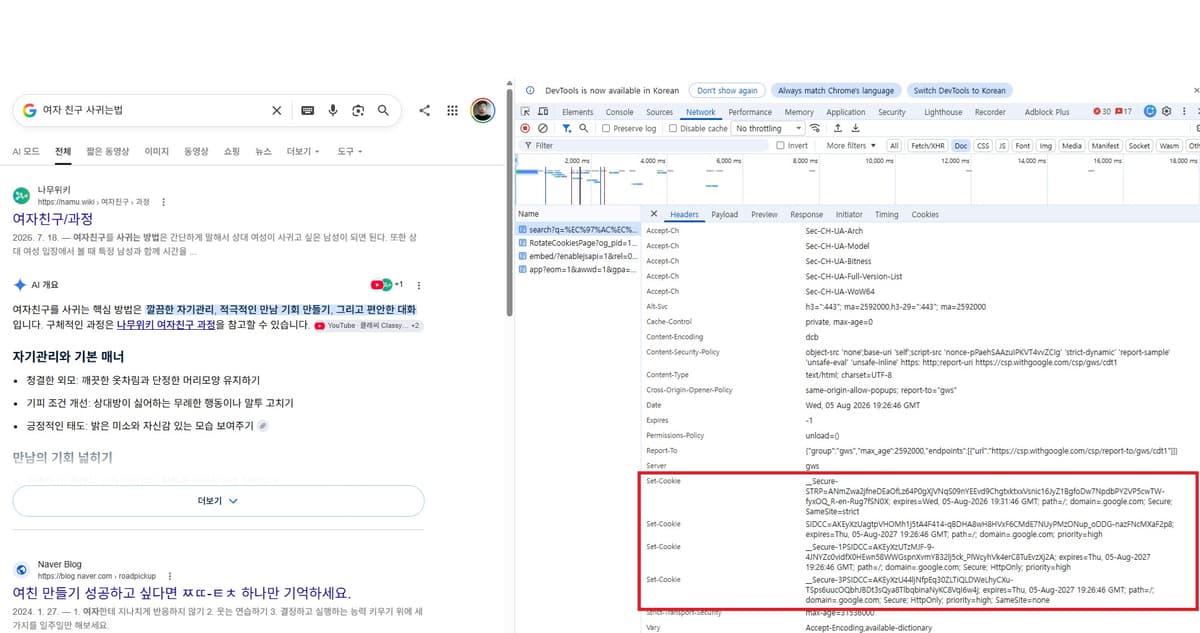
(Cookies from a Google search result for
"how to get a girlfriend" in Korean;
Google does not offer a solution for the impossible.)
The verification steps are as follows.
Open
F12 > Networkand then refresh the page.Select the top document request in the request list and look for
Set-CookieunderHeaders > Response Headers. This is the value the server sent to instruct the browser to store a cookie. If this header is absent, no new cookie was set in that response.Open the
Cookiestab for the same request. Response cookies that the browser rejected will have a warning attached, and Chrome provides a filter underMore filters > Blocked response cookiesto show only those requests.Check the
Cookiefield underCookies > Request CookiesorHeaders > Request Headersfor the next request. The value shown there is what the browser actually sent back to the server. Chrome's Network cookie inspection procedure involves selecting a request and then opening theCookiestab.Finally, under
Application > Storage > Cookies, select the current site to check its stored state.
To summarize: the Set-Cookie visible in Network response headers is the server's request to store a cookie; Application shows what the browser actually retained; and the Cookie header in the next request is the value the browser sent back to the server. If the prefix conditions are not met, the cookie appears at the first stage but not in the two stages that follow.
document.cookie in the Console is a browser API that reads cookies accessible to JavaScript. HttpOnly cookies are intentionally hidden from it, so looking only at the Console may make it seem as though even a properly stored login cookie is missing. Not every site uses __Secure- or __Host- either, so the actual list will show only the cookies issued by that site, and a cookie without a prefix is not automatically a bad cookie.
If a login session belongs to only the current host, consider __Host- first. If you need to send the cookie across multiple subdomains via Domain, or if a narrower Path like /app is strictly required, __Secure- is an option. The decision to broaden cookie scope so that all subdomains receive the same sensitive cookie should be evaluated separately.
Prefixes do not sign cookie values, nor do they prevent a stolen cookie from being reused. They only stop the browser from storing an invalid attribute combination. Even so, choosing the right name means the browser will reject a misconfiguration on the server's part. It is a rare case in computer science where naming something becomes an actual security feature.
HTTP still does not remember the user
Even with cookies, the meaning of an HTTP request does not automatically depend on a prior connection. With every request, the browser resends the value, and the server interprets that value to locate the session. If the value is absent, expired, or has been invalidated in the server's store, the user must log in again.
What cookies did is straightforward.
The server sends a small value
The browser stores it under certain conditions
The next request sends that value back
The server links it to application State
The cookie that remembers a shopping cart is not itself the cause of consent banners. It is just that humans, given a good technology, invariably find a way to turn it toward bad ends.
Even the UK ICO guidelines list cookies that remember items a user has selected through the shopping cart and checkout process as a representative case where the consent exemption may apply when they are strictly necessary to deliver the requested service. Today's enormous banners largely stem from the desire to deploy tracking technologies beyond what is strictly necessary for service delivery, such as advertising and analytics.

(The healthier end of low-quality advertising)
There is, of course, a hidden dilemma here. Share no information at all, and every ad you see will be low-quality banners along the lines of "Single moms in your area need you.".
If you want to count the single moms in your neighborhood, you can withhold your data entirely, but the moment you hand over even a little, there is at least a chance the ads will show you something you actually need, or perhaps a hobby product you genuinely care about.
In an age where ads are unavoidable, wanting a better ad experience means giving away more of yourself. Wanting less exposure means tolerating worse ads. Privacy protection and personalization convenience often pull in opposite directions.
Pull one end and the other follows. That is the privacy paradox. Even a single consent banner conceals a tension as fraught as a trade negotiation.
The law requires giving users a genuine choice, of course, but the industry's response was breathtaking. The "Accept All" button was made large and attractive at the center of the screen, while the reject option was buried as a link inside a paragraph or relegated to a second screen. I am not making this up; the EDPB Cookie Banner Taskforce report actually categorizes these exact patterns.
The absence of a reject button, pre-ticked checkboxes, inconspicuous reject links, and deceptive color contrast were all classified as dark patterns, and every one of these has been recorded as an actual enforcement case type. The industry poured its energy into appearing to comply with the law while cleverly circumventing the very choices the law intended to protect.
In 1994, the shopping cart disappeared when you turned the page; in 2026, a cookie consent dialog appears before the page does. The user still has not reached the content, yet the cart persists, and state management, you might say, has been a success.
The problem we now face is no longer "how do we maintain state."
That is a problem our predecessors solved thirty years ago. What lies before us today is "how do we read the actual content before closing the cookie consent dialog."
We saved the shopping cart, but the price was an era where opening a single web page requires two button clicks.
One to reject the cookies,
and one to confirm that you really, truly meant it.
Humanity saved the shopping cart, and in exchange, web browsing became a bureaucracy.
As always, a system that succeeds brilliantly evolves into a perfect bureaucracy, and here we are, agreeing to endless disclaimers just to bake a single HTTP header.
References
Lou Montulli, The reasoning behind Web Cookies (2013): A retrospective on the shopping cart problem at Netscape in 1994, the design of cookies, the name
magic cookie, and third-party cookies.Netscape Communications, Persistent Client State: HTTP Cookies: An archived copy of Netscape's early informal cookie specification. The preserved document itself carries no date.
RFC 1945, Hypertext Transfer Protocol: HTTP/1.0 (1996): Describes HTTP/1.0 as a generic, stateless protocol.
RFC 9110, HTTP Semantics (2022): Defines statelessness in current HTTP semantics as the property that the meaning of a request message is interpreted independently.
RFC 2109, HTTP State Management Mechanism (1997): The first Standards Track RFC that attempted to standardize
CookieandSet-Cookiebased on the Netscape proposal.RFC 2964, Use of HTTP State Management (2000): A BCP covering URL-based state transfer, caching, privacy concerns, and appropriate cookie usage.
RFC 2965, HTTP State Management Mechanism (2000): The specification that proposed
Cookie2andSet-Cookie2and superseded RFC 2109. It is now Historic.RFC 6265, HTTP State Management Mechanism (2011): Re-established interoperability rules based on actual deployed cookie behavior.
RFC Editor, RFC-to-be 10025 final review, IETF Datatracker, draft-ietf-httpbis-rfc6265bis: The successor to RFC 6265. As of August 5, 2026, it is in final review and has not yet been published as an RFC.
Mike West, Cookie Prefixes (2016 Internet-Draft): An Internet-Draft that proposed
__Secure-and__Host-as a separate document. Its content was later incorporated into RFC 6265bis.David M. Kristol, HTTP Cookies: Standards, Privacy, and Politics (2001): Documents how Netscape's implementation evolved into an IETF standard, along with the privacy debates of that period.
UNIX Programmer's Manual, Seventh Edition,
fseek(3)(1979): An early documented instance of the termmagic cookie.Lou Montulli, Why the name cookies? (2022 AMA): Montulli's own answer explaining how the operating system manual and the image of a fortune cookie influenced the name.
Federal Trade Commission, Data Brokers: A Call for Transparency and Accountability (2014): A report examining how data brokers collect, combine, and trade personal information among one another.
Information Commissioner's Office, Update report into adtech and real time bidding (2019): Covers the structure through which personal data is transmitted to multiple organizations in milliseconds during real-time ad auctions, along with concerns around sensitive information.
Google Authorized Buyers, View bidding metrics with RTB graphs: Describes the publicly documented real-time bidding response timeout as 120–300ms.
Roy T. Fielding, Architectural Styles and the Design of Network-based Software Architectures, 5.1.3 Stateless (2000): Explains the effects of REST's stateless constraint on visibility, reliability, and scalability.
OWASP, Session Management Cheat Sheet: Summarizes the exposure vectors for URL-based Session Identifiers and the scope of protection that
HttpOnlyprovides.Information Commissioner's Office, Cookies and similar technologies: Explains the consent exemption for cookies that are strictly necessary to deliver a requested service, such as a shopping cart.
European Data Protection Board, Report of the work undertaken by the Cookie Banner Taskforce (2023): Categorizes real-world cookie banner design issues, including the absence of a reject button, pre-ticked boxes, and deceptive link and button colors.
WebKit, Full Third-Party Cookie Blocking and More (2020): The announcement that Safari would block cookies from cross-site resources by default, across the board.
Mozilla, Firefox rolls out Total Cookie Protection by default to all users worldwide (2022): Documents Firefox's default rollout of a policy that partitions cookies into per-top-level-site storage jars.
Google, A new path for Privacy Sandbox on the web (2024): The announcement that Chrome's plan for a blanket phase-out of third-party cookies would be replaced with a user-choice-centered approach.
Google, Next steps for Privacy Sandbox and tracking protections in Chrome (2025): The announcement that Chrome would maintain its current approach rather than introducing a separate new third-party cookie choice prompt.
Google, Update on Plans for Privacy Sandbox Technologies (2025): An announcement summarizing the deprecation of most Privacy Sandbox technologies while retaining CHIPS, FedCM, and Private State Tokens.
Google Authorized Buyers, Test your integration: Describes the general latency limit range for real-time bidding and the
BidRequest.tmaxfield.
Footnotes
- https://cheatsheetseries.owasp.org/cheatsheets/Session_Management_Cheat_Sheet.html#session-id-content-or-value ↩
- https://www.rfc-editor.org/rfc/rfc2964.html#section-2 ↩
- https://archive.org/details/unixtimesharings0001bell/page/263/mode/1up ↩
- https://www.catb.org/jargon/html/M/magic-cookie.html ↩