
Before We Begin
The port was opened.
Open() passed without throwing an exception.
Bytes were sent via Write().
But the device returned no response. A Cold sweat. The specification clearly showed the settings were correct.
The code gets another pass.
Baud rate is correct.
Data bits 8, parity None, stop bits 1. Everything matches the spec. Yet the receive buffer is either empty or contains the exact bytes that were just sent.
Meanwhile, the supervisor's icy stare bores into the back of your neck.
At this point, most developers suspect the code.
They recalculate the frame structure, re-verify the checksum, and increase the timeout value.
That assumption is wrong.
The problem was in the wire.
Two Standards with Different Voltage Signaling Methods
RS-232 and RS-485 both carry the label "serial communication," but the way they place signals on the wire is fundamentally different.
RS-232
RS-232 operates using single-ended (unipolar) signaling. It distinguishes 0 from 1 by measuring the voltage difference between a single wire and the reference line (GND).
RS-232 voltage levels

GND ────────── reference line

Above +3V  → Logic 0
Below -3V  → Logic 1
The 9-pin D-SUB connector on the back of a PC uses this scheme.
The structure is simple, but a single-ended signal referenced to GND is vulnerable to noise. Factory floors constantly have electromagnetic interference generated by motors, inverters, and welding equipment. When this noise rides onto the signal line, the receiver can misread 0s and 1s.
That is why RS-232 is generally limited to short distances, typically within about 15 meters.
RS-485
RS-485 operates using differential signaling.
It uses two signal wires.
A ─────────
B ─────────
The receiver looks not at the absolute voltage of each wire, but at the voltage difference between the two wires.
RS-485 differential signal

A - B > 0  → Logic 1
A - B < 0  → Logic 0
Even when noise is induced on both wires simultaneously, the difference between them does not change significantly.
Before noise:

A = +2V
B = +1V

A - B = +1V


After common-mode noise +5V:

A = +7V
B = +6V

A - B = +1V
This is the key principle of differential signaling. Noise that enters both wires in the same direction cancels out, and the receiver can still read the correct logic value.
This is why RS-485 can communicate reliably over distances of hundreds of meters, even in noisy environments like factory floors.
Why Industrial Sites Use RS-485
A factory connects more devices than you might expect. It is rare for a single PLC to be the only device; multiple LVDT amplifiers, inverters, barcode scanners, and touch panels are typically strung together.
The challenge is that all of these must communicate with a PC or PLC.
This is where the practical difference between RS-232 and RS-485 becomes clear.
RS-232 is fundamentally point-to-point. Connecting one device requires one port.
From the PC's perspective, it looks like this.
PC ── COM1 ── Device 1
PC ── COM2 ── Device 2
PC ── COM3 ── Device 3
As the number of devices grows, so does the number of COM ports required. Ten devices means ten ports.
In practice, this is nearly impossible on a real factory floor.
There are never enough ports, the wiring becomes complicated, and maintenance gets even harder. Even a small structural change requires re-running the cables.
That is why RS-485 is used instead.
RS-485 has a fundamentally different architecture. Two wires (A and B) form a single shared bus, and all devices connect to that bus.
PC ── A/B ──┬── Device 1 (Address 1)
            ├── Device 2 (Address 2)
            └── Device 3 (Address 3)
All devices share the same wire without colliding, because the system operates on an address-based scheme.
When the PC calls a specific device, it sends a request like this:
"Address 1, send data."
Only the device at address 1 responds; all other devices remain silent.
Thanks to this architecture, just two wires can support multiple devices.
The wiring stays simple, and there is no constraint on the number of ports. On top of that, RS-485 supports longer cable runs and is more resistant to noise.
That is why RS-485 has become the de facto standard on industrial sites. Of course, not every industrial site uses RS-485 exclusively.
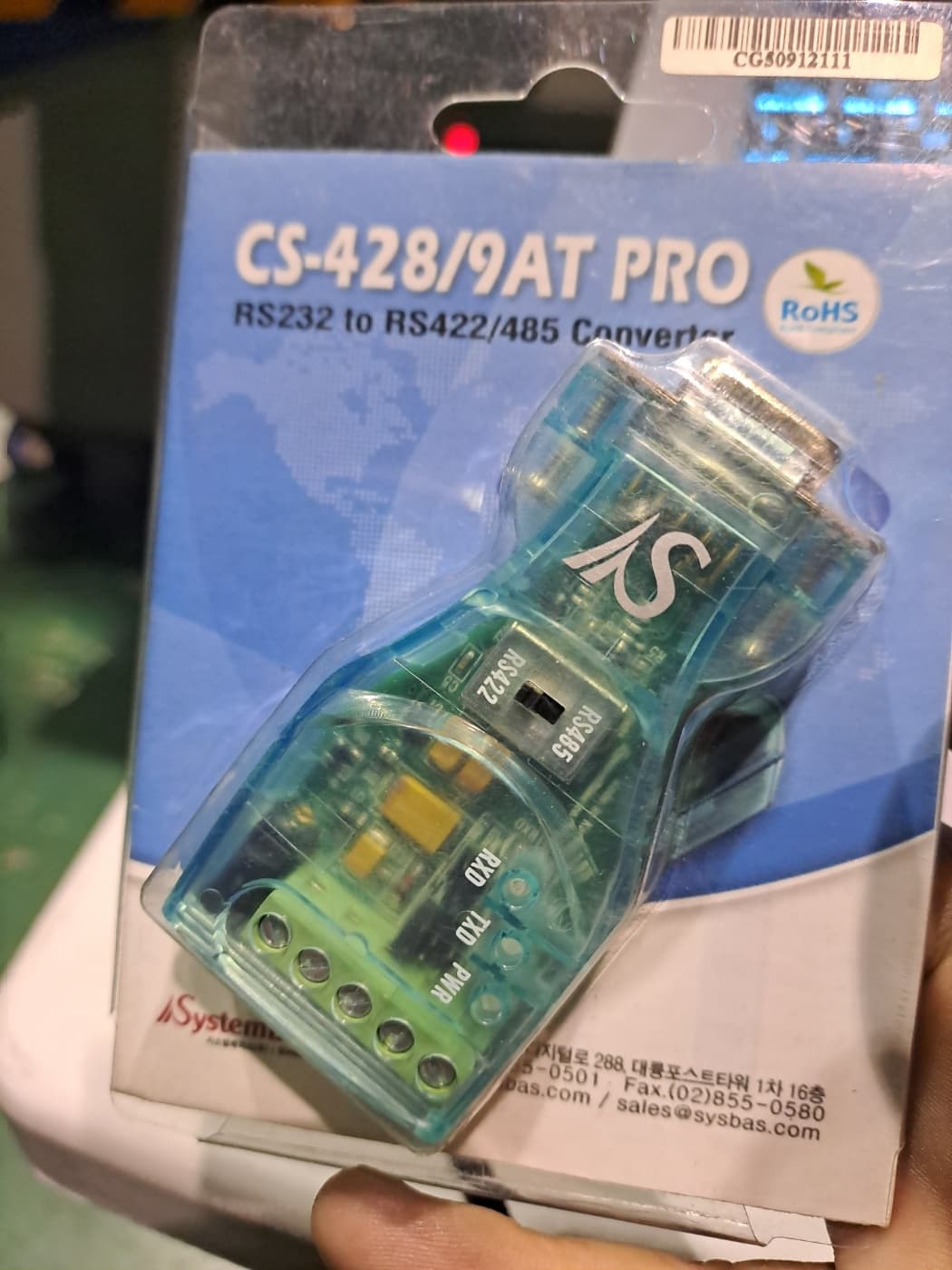
(Converter photographed on site)
RS-232 devices show up frequently in the mix. The reasons are straightforward.
It is either a budget constraint or a purchasing mistake.
In these cases, the solution is to add an RS-232-to-RS-485 converter.
If a USB-to-serial converter is chosen here, quality matters.
Generic USB converters bought at the lowest price from a retail store or online marketplace sometimes cannot handle the polling load of an industrial environment. When polling runs in a 30 ms cycle, the USB host controller load increases, and some converters drop the COM port on their own under that load. In code, this shows up as SerialPort.Open() throwing a FileNotFoundException.
Because the symptom is intermittent, with the port appearing and disappearing, tracing the root cause is difficult.
For any line running in serious production, a PCI/PCIe RS-485 card is recommended over a USB converter. It connects directly to the bus so there is no USB contention, the driver is stable, and industrial-grade products based on the FTDI chipset even support galvanic isolation for electrical noise rejection.
If a USB converter must be used, verify that the product is based on the FTDI FT232 or FT485 chipset, and use the official driver from the manufacturer.
How do I know all this? I wished I didn't.
What Is RS-422?
Electrically, RS-422 is nearly identical to RS-485.
It uses differential signaling. It is resistant to noise and supports long cable runs.
The difference is directionality.
RS-485 defaults to half-duplex. Two wires alternate between transmitting and receiving. Only one direction is possible at any given moment.
RS-422 uses four wires in total: two dedicated to transmitting and two dedicated to receiving. It is full-duplex, meaning transmission and reception can happen simultaneously. The trade-off is that multidrop is not supported. RS-422 is strictly point-to-point.
RS-422 commonly appears on high-speed serial ports of PLCs and in servo driver communication. If a PC-side serial port is labeled "RS-422 supported," that means a 4-wire connection is required.
Checklist for Field Testing
The port is correct, the baud rate is correct, and the cable is properly seated. Still nothing. Here is a breakdown of where to look, ordered by the symptoms most commonly encountered in the field.
ECHO_ONLY: The Most Common Misdiagnosis
The port is opened and bytes are sent, but the exact bytes that were sent come back.
This situation arises from two different causes.
First: An RS-485 device connected to an RS-232 port
This cannot be fixed in software.
An RS-232 port outputs single-ended voltage signals. An RS-485 device expects differential signals. The two standards are electrically incompatible. The single-ended signal the PC outputs cannot drive the RS-485 line, so TX loops back to RX and returns to the sender.
That is why the bytes sent appear unchanged in the receive buffer.
No amount of inspecting the device or modifying the code will fix this. An RS-232-to-RS-485 converter must be added, or a serial card that supports RS-485 must be installed.
When this situation is suspected, the fastest way to confirm is the Windows Device Manager.
DeviceID: ACPI\PNP0501If you see this prefix, the port is a motherboard-integrated UART.
It is RS-232 only. External hardware is required to communicate with an RS-485 device.
Second: Normal echo occurring on RS-485 half-duplex
In RS-485 half-duplex, the bytes the PC transmits travel through the same bus line and also arrive at the receive side. This is normal by hardware design.
The problem arises when the software does not handle this echo: it either mistakes the echo for the device's actual response, or the echo and the real response arrive interleaved, causing parsing to go out of sync.
The fix is straightforward. Immediately after sending a request, read and discard a number of bytes equal to the length of the request. The bytes that arrive after that are the device's actual response.
// RS-485 Half-Duplex Echo Handling
port.Write(command, 0, command.Length);

// Discarding Echo: Read and Ignore the Transmitted Bytes
var echo = new byte[command.Length];
var totalRead = 0;
while (totalRead < command.Length)
{
    totalRead += port.Read(echo, totalRead, command.Length - totalRead);
}

// From here, the actual device response begins
var response = ReadResponse(port);
Third: Echo returns but no response follows
If the echo comes back normally but nothing arrives after it, the cable and port are fine. The next thing to check is device power.
On an RS-485 bus, the echo still returns even when a device is physically connected but powered off. The echo is a signal reflection on the bus line, not something the device processes and sends back. If the device is off, the echo arrives, but the response data never comes.
In the field, a large share of "nothing changed in the code but it suddenly stopped working" complaints fall into this category. Either the device's circuit breaker was tripped, or the device entered an alarm state and halted communication.
Termination Resistors: The Variable That Is Easy to Miss
There is one more thing to take care of when running an RS-485 bus over a long distance.
That is the termination resistor.
A 120 Ω resistor must be placed at each end of the bus. Without it, the signal reflects at the end of the bus and travels back. When the reflected signal interferes with the original signal, data gets corrupted.
Over short distances (a few meters), this may not cause problems. But as the cable length increases or more devices are added, symptoms begin to appear.
If RS-485 communication on site fails intermittently, or errors increase as the baud rate rises, suspect the termination resistor.
Many devices have a built-in DIP switch on the unit to enable or disable the termination resistor.
As a side note, shorter cable runs are always better.
Long, drooping cables pick up more noise and also catch the ankles of passing workers.
The second hazard happens far more often than you would expect.
How to Identify the Standard
You cannot tell just by looking at the cable.
Both RS-232 and RS-485 can use a DB9 connector. They look the same on the outside but are different on the inside.
Verification steps:
1. The communication specifications page in the device manual. It will explicitly state "Interface: RS-485" or "RS-232C."
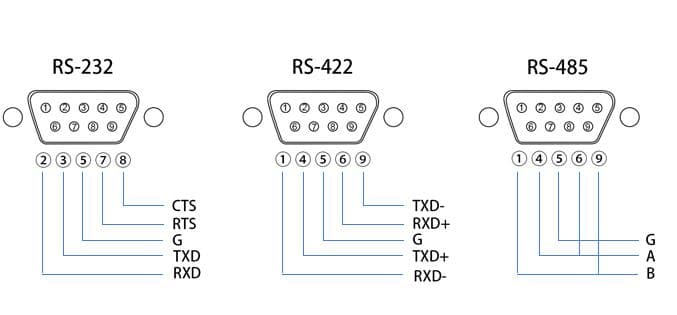
2. The cable wiring diagram. RS-232 uses three wires as a baseline: TXD, RXD, and GND. RS-485 uses two wires: A(+) and B(-). RS-422 uses four wires: TX+, TX-, RX+, and RX-.
3. Legacy code. If there is code that previously worked, look at the SerialPort initialization section. Settings for RtsEnable or DtrEnable, or specific flow control configuration, can be a clue. Some RS-485 converters use the RTS signal to switch the direction of transmission and reception.
What Changes in C# Code
The SerialPort initialization code itself is identical for RS-232 and RS-485.
The way baud rate, data bits, parity, and stop bits are set is the same.
There are three differences. Before getting to those, however, some background knowledge is needed.
What Are RTS and DTR?
The RS-232 standard includes dedicated control signal lines in addition to the data lines (TXD and RXD). Two of these that come up frequently in practice are RTS and DTR.
RTS (Request To Send) was originally a signal meaning "I am ready to send data now," used to notify the other party. In the modem era, it handled flow control. In today's industrial environments, it is more commonly used to switch the transmit/receive direction on RS-485 converters than for its original purpose. Because RS-485 is half-duplex and only one direction is possible at a time, some converters switch to transmit mode when RTS is HIGH and to receive mode when RTS is LOW.
DTR (Data Terminal Ready) was originally a signal meaning "the terminal is ready." Today, some devices repurpose it as a power-on or activation signal. If DTR is LOW, there are devices that will refuse to communicate at all.
When using an RS-485 converter, some converter models use the RTS signal to switch the TX/RX direction, depending on the model.
//An example of port and baud rate settings from a previous project
var port = new SerialPort("COM4", 19200, Parity.None, 8, StopBits.One);

// If you use a converter that requires direction switching in RS-485 Half-Duplex mode
port.RtsEnable = true;   // Some converters use RTS to switch the TX/RX direction
port.DtrEnable = false;
If the setup is a direct RS-232 connection or uses a converter with automatic direction switching, neither signal needs to be touched.
//Port and baud rate examples from a previous project
var port = new SerialPort("COM4", 19200, Parity.None, 8, StopBits.One);
// For a direct RS-232 connection, both are typically false
port.RtsEnable = false;
port.DtrEnable = false;
There are also cases where RTS/DTR is used not for converter direction switching but as an activation signal for the device itself. Some barcode scanners are designed to output data only when both DTR and RTS are HIGH. In that situation, leaving both values as false means the port opens and the communication parameters are correct, yet no data ever arrives. Checking whether the manual specifies DTR/RTS requirements is the first step in this case.
// Some barcode scanners (when the manual specifies DTR/RTS requirements)
port.DtrEnable = true;
port.RtsEnable = true;
The RTS direction-switching behavior varies by converter model. Some converters handle it automatically, while others require manual RTS toggling. Consult the manual.
Whether echo handling is needed:
Physical Standard | Echo Handling Required |
|---|---|
RS-232 | Not required |
RS-422 (Full-Duplex) | Not required |
RS-485 Half-Duplex | Required |
RS-485 Full-Duplex (4-wire) | Not required |
- Physical Standard
RS-232
- Echo Handling Required
Not required
- Physical Standard
RS-422 (Full-Duplex)
- Echo Handling Required
Not required
- Physical Standard
RS-485 Half-Duplex
- Echo Handling Required
Required
- Physical Standard
RS-485 Full-Duplex (4-wire)
- Echo Handling Required
Not required
Of course, the field is never straightforward, so even after confirming everything,
there are times when the echo does not come back. Converters with built-in automatic direction control handle the TX/RX switching in hardware and do not return the echo to the host.
If code that reads and discards bytes equal to the sent length runs on such a converter, there is no echo to discard, so the code ends up discarding the beginning of the actual response, mistaking it for an echo.
The echo size equals the length of the command frame sent. Depending on the protocol, the command frame itself may be variable-length. Because the echo size varies with the command type even for the same device, it is safer to pass command.Length directly in the echo-discard code rather than hardcoding a value.
port.Write(command, 0, command.Length);

// Echo size = length of the sent command
var echoSize = command.Length;
var buffer = new byte[echoSize + expectedResponseSize];
var totalRead = ReadWithTimeout(port, buffer);

if (totalRead < echoSize)
{
    // Echo is shorter than expected or absent → auto direction-switching converter environment
    // Treat the entire received data as the response
    ParseResponse(buffer[..totalRead]);
    return;
}

if (totalRead == echoSize)
{
    // Echo received but no response → device is powered off or address mismatch
    Log("ECHO_ONLY");
    return;
}

// Normal case: discard the echo and parse the response
ParseResponse(buffer[echoSize..totalRead]);// ReadWithTimeout Implementation Example
private static int ReadWithTimeout(SerialPort port, byte[] buffer)
{
var totalRead = 0;
var deadline = DateTime.UtcNow.AddMilliseconds(port.ReadTimeout);
while (totalRead < buffer.Length && DateTime.UtcNow < deadline)
{
var available = port.BytesToRead;
if (available > 0)
{
var chunk = Math.Min(available, buffer.Length - totalRead);
totalRead += port.Read(buffer, totalRead, chunk);
}
else
{
Thread.Sleep(5);
}
}
return totalRead;
}When writing echo-handling code, check the converter's datasheet for an Auto Direction Control or Echo Suppression entry.
If the entry is present, treat the environment as one without echo.
What Runs on Top of RS-485
Everything covered so far belongs to the physical layer: which wire is used, what the signal looks like, and why echo occurs.
All of that is the story before data is even placed on the wire.
Once the wire is ready, the next step is to define the format in which data is exchanged. That is the protocol.
The most widely used protocol running over RS-485 in industrial environments is Modbus RTU. Modicon created it in 1979, and to this day the majority of inverters, power meters, temperature controllers, and low-cost sensors support it. Unlike PLC vendor-specific protocols such as Mitsubishi MC Protocol, Siemens S7, and Omron FINS, Modbus is not tied to any particular vendor.
This means devices from different manufacturers can coexist on the same RS-485 bus and use Modbus as a common language.
The next installment will cover exactly what frame structure Modbus uses, how CRC is calculated, and how to implement it in C#.
Summary
If the port is opened and bytes are sent but no response comes back, or only an echo returns, check these things before looking at the code.
Is the device RS-485 while the PC has only an RS-232 port?
If so, a converter is needed.
Is RS-485 half-duplex in use but echo-handling code is missing?
If so, response parsing will go out of sync.
Is the bus long but termination resistors are absent?
If so, intermittent errors will occur.
If any one of these three is missing, communication will fail no matter how well the code is written.
The next installment covers the actual format used to exchange data once the wire and port are properly set up.
That means frame structure and protocol.